
A brief, high-level introduction to how code can be hosted and pulled by “go get”.
Hint/Trick
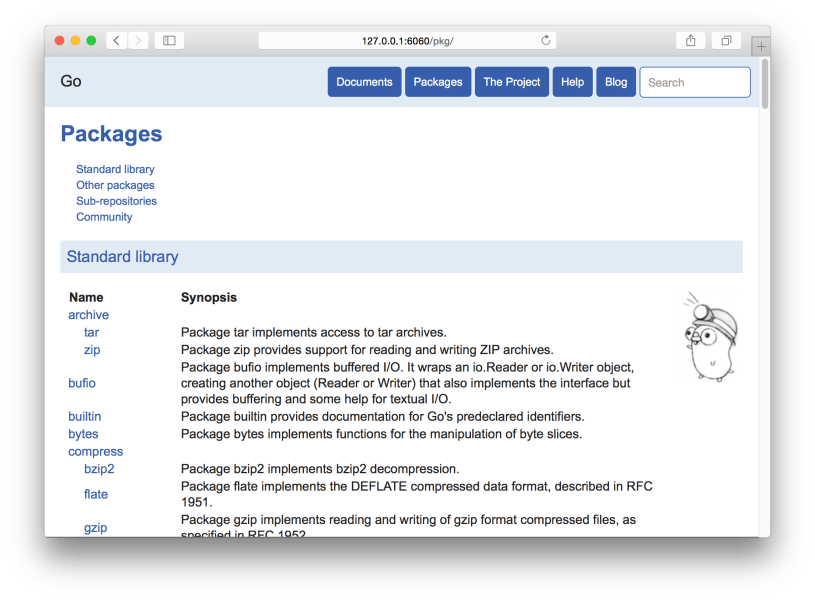
Go Offline Documentation
Go comes with a built-in documentation server. Its homepage actually resembles the main Go homepage, but it pulls most of this content from external sources. Most/all of the documentation, however (even documentation related to old releases) is locally hosted.
go1.5.3/bin$ ./godoc -http=:6060
Then, visit it at http://127.0.0.1:6060.
PriorityQueue versus heapq
Python’s queue.PriorityQueue queue is actually based on the heapq module, but provides a traditional Python queue interface. The difference appears to largely be the interface: OO vs. passing a list (which heapq can act on directly).
The documentation for PriorityQueue is a little misleading, at least when you didn’t take a moment to think about how the sorting works. This is what it says:
A typical pattern for entries is a tuple in the form: (priority_number, data)
I ran into an issue where I was getting an error when the second parameter (the actual item) couldn’t be used to sort. Whereas the documentation implies that there’s a convention the expects the priority to be in the first spot, it looks like the sort is just evaluating the entire tuple. This means that, when I was trying to insert with a priority that was already in the queue, the second item of both was being compared (this is how tuples are sorted). Curiously, I guess most of my previous use-cases involved priorities (such as timestamps) that were either sparse enough or the data happened to be sortable. Crap.
Now, looking back at the documentation for heapq, I’ve noticed one of the examples:
>>> h = []
>>> heappush(h, (5, 'write code'))
>>> heappush(h, (7, 'release product'))
>>> heappush(h, (1, 'write spec'))
>>> heappush(h, (3, 'create tests'))
>>> heappop(h)
(1, 'write spec')
So, it turns out that heapq also [hastily] recommends using tuples, but we now know that this comes with a lazy assumption: It only works if you’re willing to allow it to sort by the item itself if two or more items share a priority.
So, in conclusion, the nicest strategy is to use an object that has the “rich-comparison methods” defined on it (e.g. __lt__ and __eq__) rather than tuples. This will allow you to constrain the comparison operations.
Extracting Tokens from a String Template (Python)
Python provides regular-expression-based baked-in string-templating functionality. It’s highly configurable and allows you to easily do string-replacements into templates of the following manner:
Token 1: $Token1
Token 2: $Token2
Token 3: ${Token3}
You can tell it to use an alternate template pattern (using an alternate symbol or symbols) as well as being able to tell it to work differently at the regular-expression level.
It’s not spelled-out how to extract the tokens from a template, however. You would just use a simple regular-expression-based search:
import string
import re

text = """
Token 1: $Token1
Token 2: $Token2
Token 3: $Token3
"""

t = string.Template(text)
result = re.findall(t.pattern, t.template)
tokens = [r[1] for r in result]
print(tokens)
#['Token1', 'Token2', 'Token3']
Copying All (Including Hidden) Files From One Directory Into Another
I just noticed a Superuser question with ~80000 views where people were still generally-clueless about a commandline trick with file-copying. As there was only a slight variation of this mentioned, I’m going to share it here.
So, the following command can be interpreted two different ways:
$ cp -r dir1 dir2
- If
dir2exists, copydir1intodir2asbasename(dir1). - If
dir2doesn’t exist, copydir1intodirname(dir2)and name itbasename(dir1).
What if you want to always copy the contents of dir1 into dir2? Well, you’d do this:
$ cp -r dir1/* dir2
However, this will ignore any hidden files in dir1. Instead, you can add a trailing slash to dir1:
$ cp -r dir1/ dir2
This will deterministically pour the contents of dir1 into dir2.
Example:
/tmp$ mkdir test_dir1
/tmp$ cd test_dir1/
/tmp/test_dir1$ touch aa
/tmp/test_dir1$ touch .bb
/tmp/test_dir1$ cd ..
/tmp$ mkdir test_dir2

/tmp$ cp -r test_dir1/* test_dir2
/tmp$ ls -1a test_dir2
.
..
aa

/tmp$ cp -r test_dir1/ test_dir2
/tmp$ ls -1a test_dir2
.
..
.bb
aa
The Superuser question insisted that you needed a period at the end of the from argument which isn’t accurate (but will still work).
Creating a Case-Sensitive Partition in OSX
I work inside of Vagrant on my Mac system. I only just ran into a case-sensitivity problem that led to the wrong libraries being included. For, even though I’m running in an Ubuntu instance, it’s still subject to the rules of the filesystem that it’s only just sharing off the host system. So, the time has come to fix this annoying little trait of my Mac environment.
Go to Disk Utility and create an image. Make sure you select a case-sensitive format (e.g. “Mac OS Extended (Case-sensitive, Journaled)”):
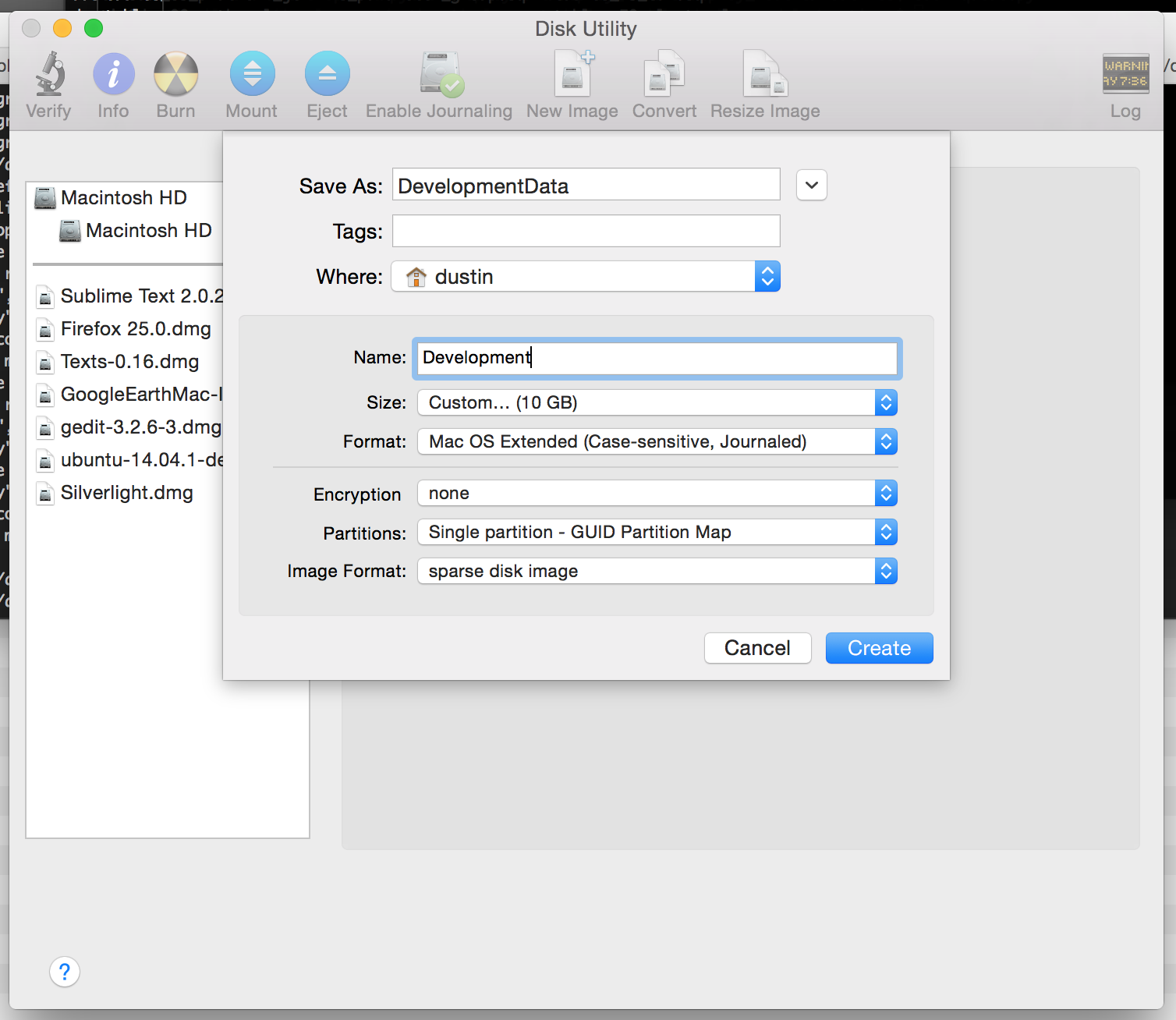
Notice that I chose “sparse disk image” for “Image Format”. This starts with a minimally-sized container that’ll grow as I populate it with data, rather than starting off at the requested size.
Since you’re probably going to want to mount this image on a particular folder, unmount it using Disk Utility or Finder (since it would’ve automatically been mounted after you created it). Then, go to the command-line and mount it where ever you’d like:
$ hdiutil attach -mountpoint ~/development DevelopmentData.sparseimage
After that, the sky is the limit. Naturally, consider using “rsync -a” if you have to copy existing files there.
Python: Recursive defaultdict
collections.defaultdict is a fun utility that is used to create an indexable collection that will implicitly create an entry if a key is read that doesn’t yet exist. The value to be used will be instantiated using the type passed.
Example:
import collections

c = collections.defaultdict(str)
c['missing_key']
print(dict(c))
#{'missing_key': ''}
What if you want to create a dictionary that recursively and implicitly creates dictionary-type members as far down as you’d like to go? Well, it turns out that you can also pass a factory-function as the argument to collections.defaultdict:
import collections

def dict_maker():
    return collections.defaultdict(dict_maker)

x = dict_maker()
x['a']['b']['c'] = 55
print(x)
#defaultdict(<function dict_maker at 0x10e1dbed8>, {'a': defaultdict(<function dict_maker at 0x10e1dbed8>, {'b': defaultdict(<function dict_maker at 0x10e1dbed8>, {'c': 55})})})
To make the result a little nicer:
import json

print(json.dumps(x))
#{"a": {"b": {"c": 55}}}
Issues between Vagrant/VirtualBox and your Webserver
It turns out that there could be issues when you’re changing files on your local system and using them from a VirtualBox VM. This can/will you if you’re working with small, static files under Vagrant when using VirtualBox as a provider.
You might make changes that result in unexpected, non-sensical, character-encoding issues on the remote system or even any lack of any updates appearing whatsoever. For me, this affected my JavaScript and CSS files.
To fix this, add “sendfile off;” to the location-blocks (if using Nginx) that are responsible for your static files.
Reference: http://docs.vagrantup.com/v2/synced-folders/virtualbox.html
Brew: Getting the install path of a package
Easy and simple, and recorded here for quick recollection:
$ brew --prefix openssl
/usr/local/opt/openssl
This is a symlink to the path in Cellar:
$ ls -l `brew --prefix openssl`
lrwxr-xr-x  1 dustin  staff  26 Apr 14 20:25 /usr/local/opt/openssl -> ../Cellar/openssl/1.0.2a-1


You must be logged in to post a comment.