Searching for Specific Packages in NuGet

Package searches in NuGet hit the query API and the query API, by default, does a substring search. This obviously might get annoying when a simple string that you’re searching for might appear within any of the searchable characteristics of many different packages.

However, since this is the standard query interface, and you can pass more than just flat strings, you can also modify the query to do an exact search using the “PackageId” modifier:

C:\>nuget list zebus
Zebus 1.4.6
Zebus.Directory 1.2.10
Zebus.Directory.Cassandra 1.2.10
Zebus.Directory.Standalone 1.2.10
Zebus.Persistence 1.0.2
Zebus.Persistence.CQL 1.0.2
Zebus.Persistence.CQL.Testing 1.0.2
Zebus.Testing 1.4.6

C:\>nuget list PackageId:zebus
Zebus 1.4.6

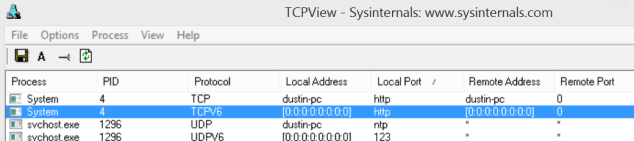
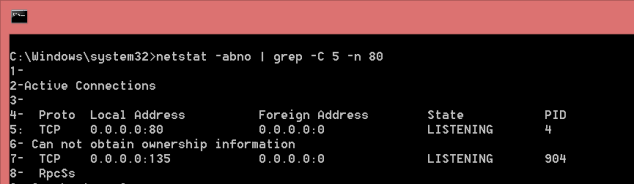
“System” process bound to port 80 in Windows: “Can not obtain ownership information”

I have a port forwarded from another host to my local port 80. Of course this is occasionally problematic as I have other things that also want to use port 80. Unfortunately, I have some projects that embed some URLs to point to port 80. So, I simply stop and start the various port 80 services as required. Unfortunately, sometimes everything is fine and other times I end-up with port 80 being bound by an unidentifiable running process seemingly no matter how often I restart, even when I’ve made sure that there are no port-80 sites in my IIS. I inexplicably don’t often run into this problem (it seems like I should).

netstat indicates that a process with PID 4 is bound to it but can’t give me its name (this is an elevated prompt):

1_Port80Bound

TCPView says that it’s actual “System” (read: Windows):

2_Port80Bound

However, it turns out that it’s the “World Wide Web Publishing Service”. Turn it off (or disable it, sue Microsoft for damages, etc..):

3_Port80Bound


You’ll be all set. Why does this service want port 80 when none of my sites are configured to use port 80? We’ll file it under “$!?!!%” for now.

“Invalid Credentials” When Using TFX Tool to Login to TFS

The cross-platform TFX tool is, among other things, what you use to create new boiler-plate VSIX extensions (to populate with your own information) as well as to upload individual Release Management (vNext) tasks to TFS 2015. Previously, I’ve logged in using a fully-qualified UNC-formatted username (\domain\dustin.oprea) but this started, suddenly, not working for me. I have not applied any noteworthy updates. I did recently have to change my password (per group policy), but that may or may not have affected it.

As my web-based TFS UI indicated that I was logged-in as “DOMAIN\dustin.oprea”, I unsuccessfully tried logging in as that at the command-line. Eventually, I opened up a private session within the browser in order to log-in using that same username but the UI refused to log me out (even though it was a private session, I was always logged-in). I tried clearing web credential in Windows, but, alas, nothing was stored there (if that could’ve even helped).

I also restarted the system just in case there was credentials-related caching in the system, in or outside of TFS’ application pool.

It turns out that now logging-in with a fully-qualified email-account as my username works just fine.

For example:

C:\>tfx login --auth-type basic --service-url http://localhost:8181/tfs/DefaultCollection --username dustin@email.com
TFS Cross Platform Command Line Interface v0.3.20
Copyright Microsoft Corporation
> Password:
Logged in successfully

Thanks, TFS. Do you think you might unify how users are logging-in both at the command-line and in the UI? Maybe?

Thanks to Could Not Connect, Invalid Credentials, Bad Username/ID/Password for drawing my eye to this potential option.

Odd “find” Behavior Under Windows: “paths must precede expression”

I noticed a problem in the “find” version being delivered in the currently available GnuWin32. I have csproj files strewn throughout a tree. Most of the sln files are in the root. I can search for csproj‘s but I get an error with sln‘s.

D:\sc_root>c:\gnu\find . -name "*.csproj"
<...>
^C

D:\sc_root>c:\gnu\find . -name "*.sln"
c:\gnu\find: paths must precede expression
Usage: c:\gnu\find [-H] [-L] [-P] [path...] [expression]

Of course I’m already using quotes to prevent premature expansion but it’s not making a difference.

It looks like this might be a recent bug. If you sabotage Windows’ ability to expand before find can process the expression by using something Windows can’t understand, then it’ll work just fine:

c:\sc_root>c:\gnu\find . -name "*[.]sln"
<...>

Special thanks for this SO post.

TFS Release Management Build Agent Doesn’t Pickup Jobs

If your build tells you “Build Not started”, “Waiting for an available agent”, or “Waiting for an agent to be requested”, make sure that your agent is running (if as a service, then it’s called “VSO Agent”) as well as the “Visual Studio Team Foundation Background Job Agent” service. The latter feeds the former. In my case, I am using TFS 2015 and the latter appeared to be configured as “Automatic (Delayed Start)” but had to be configured as “Automatic” instead.