AWS: Getting The Month-To-Date Account Balance From CLI/Boto

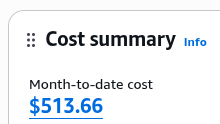
I’m trying to post metrics for the current balance. The balance in the current account is 513.66 . The suggestions I found online were variations of this with the same result:

$ aws ce get-cost-and-usage --time-period Start=2026-05-01,End=2026-06-01 --granularity MONTHLY --metrics "UnblendedCost" --query 'ResultsByTime[0].Total.UnblendedCost.Amount' --output text
-0.0000001087

The response is typically 0.0, plus/minus some degree of tiny floating-point error.

Clicking on the amount in the Console…:

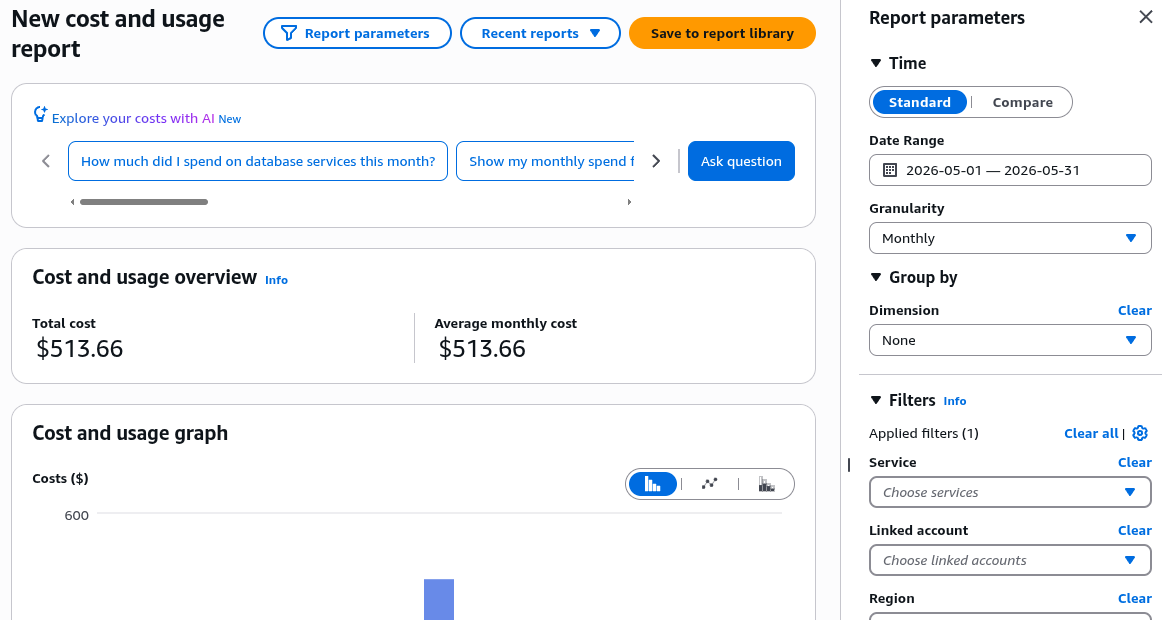
…will take you to the actual reporting screen:

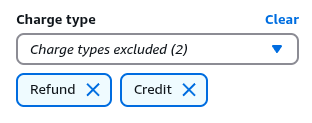
Looking at the filters, it shows that “(1)” was applied. Interesting. Expanding the extra filters at the bottom, it suddenly shows some excluded items under “Charge type”:

This ended-up being the culprit. It’s not clear how this influences the results since I also calculated month-to-date balance values for every day of the present month, and they were all near zero regardless. However, accounting for this at the CLI finally produced a matching balance (using the --filter parameter):

$ aws ce get-cost-and-usage --time-period Start=2026-05-01,End=2026-06-01 --granularity MONTHLY --metrics "UnblendedCost" --query 'ResultsByTime[0].Total.UnblendedCost.Amount' --output text --filter '{"Not":{"Dimensions":{"Key":"RECORD_TYPE","Values":["Credit","Refund"]}}}'
513.6641476331

For completeness, this is the corresponding Python script for retrieving the same thing with Boto:

import boto3
cost_explorer_client = boto3.client("ce")
get_cost_and_usage_response = cost_explorer_client.get_cost_and_usage(
TimePeriod={
"Start": "2026-05-01",
"End": "2026-06-01",
},
Granularity="MONTHLY",
Metrics=["UnblendedCost"],
Filter={
"Not": {
"Dimensions": {
"Key": "RECORD_TYPE",
"Values": ["Credit", "Refund"],
},
},
},
)
results_by_time_rows = get_cost_and_usage_response["ResultsByTime"]
first_result_row = results_by_time_rows[0]
total_block = first_result_row["Total"]
unblended_cost_block = total_block["UnblendedCost"]
print(unblended_cost_block["Amount"])

Connecting an LLM CLI to N8N On a Private Network Using n8n-mcp

The “n8n-mcp” MCP by default restricts access to a local, private network. This is an example of a config template that allows for it:

{
"mcpServers": {
"n8n-mcp": {
"command": "npx",
"args": ["n8n-mcp"],
"env": {
"MCP_MODE": "stdio",
"LOG_LEVEL": "error",
"DISABLE_CONSOLE_OUTPUT": "true",
"N8N_API_URL": "http://192.168.10.5:55678",
"N8N_API_KEY": "<API key>",
"WEBHOOK_SECURITY_MODE": "permissive"
}
}
}
}

We have an SSH connection from the remote N8N system (in another part of the world) to a local server (managed by autossh), with :55678 bound to 0.0.0.0 on our local server and forwarded back to :5678 on the remote one. The MCP on our local system talks to :55678 on our local server.

Programmatically Retrieving the Inode For a File In Linux

ls uses the stat structure to provide this information via ls -i. Therefore, it should be available via any programming language whose stat implementation passes this information through:

$ ls -i .bashrc
18731977 .bashrc
$ python
>>> import os
>>> s = os.stat('.bashrc')
>>> s.st_ino
18731977

Reduce Rust Verbosity In Sublime

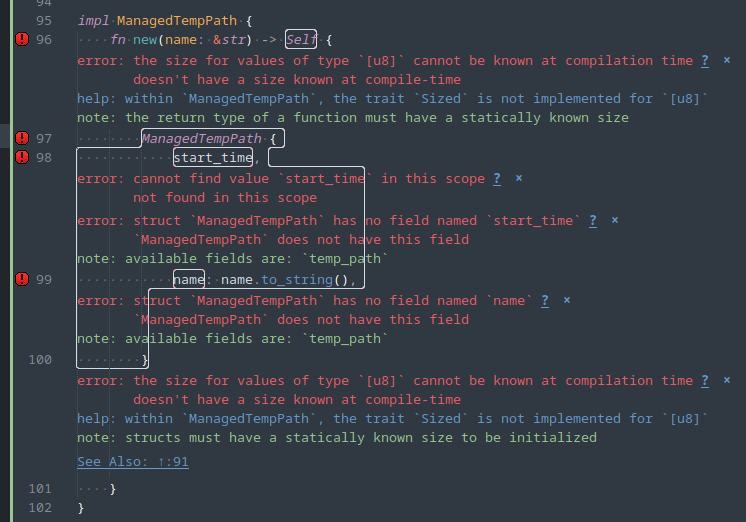
The “Rust Enhanced” Sublime package is extremely noisy (“fruit salad”) with its syntax checks, by default:

To reduce the amount of this noise, I use these settings:

{
    "rust_syntax_hide_warnings": true,
    "rust_message_status_bar": true,
    "rust_region_style": "stippled_underline",
    "rust_phantom_style": "none",
}

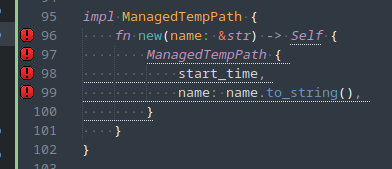
..which results in:

This is much less intrusive. However, you’ll have to run a manual build and look in the bottom panel for the error messages as the markers in the gutter don’t expose them. This should be, at least, less intrusive for most developers.

The Various Versions of IP Addresses

Courtesy of Wikipedia:

During the development of the first version of the Internet Protocol in the 1970s, the initial experimental versions 1 to 3 were not standardized. The first working version that was widely deployed was assigned version number 4.

A separate protocol based on reliable connections was developed and assigned version 5.

IP version 7 was chosen in 1988 by R. Ullmann as the next IP version because he incorrectly assumed that version 6 was in use for ST-II. However, ST-II had reused version 5 of the original ST protocol.

In the early 1990s, when it became apparent that IPv4 could not sustain routing in a growing Internet, several new Internet Protocols were proposed. The Internet Protocol that finally emerged was assigned version number 6, being the lowest free number greater than 4.

The PIP protocol and TUBA protocol used versions 8 and 9, following version 7 for TP/IX.

In 2004, an IPv9 protocol was developed in China using 256-bit addresses.

Git: Grafting Commits (Simple And Sweet)

There are a lot of posts sharing techniques of many degrees of complexity of how to rebase/graft/replace a bunch of commits, but this is the process given the simplest case:

git rebase --onto <new parent> <old parent>

Given the parent commit of the series of commit, move that series to a different parent.

So, given these commits under BRANCH1:

AAA (HEAD)
AAB
AAC
AAD

..and these commits under BRANCH2:

BBA
BBB
BBC
BBD

…in order to place AAA->AAB->AAC on top of BBA->BBB->BBC:

git rebase --onto BBA AAD

Standard rev-parse rules apply (you can use branches/tags instead of revisions).

Enforcing Complex Passwords In Manjaro

Manjaro has a weird password-quality setup. The password-quality functionality is provided by the libpwquality package, which provides a PAM plugin named pwquality.so and configuration at /etc/security/pwquality.conf . However, once installed it seems to still not be referenced by the PAM configuration and will not be applied to password changes.

Before making changes, open a root prompt. You will make your changes here and have a place to restore your configuration from if you break anything. Make a backup of /etc/pam.d/system-auth .

Make sure you have the libpwquality package installed.

Open /etc/pam.d/system-auth . There are PAM configurations that deal with authenticating the user and PAM configurations that deal with updating passwords. Look for the password-setting configuration block; those lines will have “password” as the module-type (first column):

-password  [success=1 default=ignore]  pam_systemd_home.so
password   required                    pam_unix.so          try_first_pass nullok shadow
password   optional                    pam_permit.so

Insert the line for pam_pwquality.so above (always above) pam_unix.so, and update the configuration for pam_unix.so to:

password requisite pam_pwquality.so retry=3
password required pam_unix.so try_first_pass nullok shadow use_authtok

The change will apply immediately, though you probably will not see a difference with the default password-quality configuration settings.

Make your desired changes to /etc/security/pwquality.conf . We recommend the following settings:

minlen = 10
dcredit = -1
ucredit = -1
lcredit = -1
ocredit = -1

Open the shell for a nonprivileged account that you would like to use to test password changes and proceed to test the password-quality options that you enabled in order to ensure they work as expected. If you made a mistake, fix them in the root console that you should still have open.

Important note: Unless you have enabled “enforce_for_root” in the password-quality or PAM configuration, you will only see advisory warnings for nonconformant passwords when running as root. You will still be able to set any password you’d like.

Retrieving Your Shopify Store’s GraphQL Schema

Using Python and SGQLC with Shopify’s latest API (2025-01):

$ python3 -m sgqlc.introspection https://<subdomain>.myshopify.com/admin/api/2025-01/graphql.json -H "X-Shopify-Access-Token: <secret>"

{
  "data": {
    "__schema": {
      "directives": [
        {
          "args": [
            {
              "defaultValue": "null",
...

Incidentally, Shopify’s Python client establishes the schema’s URL here:

https://github.com/Shopify/shopify_python_api/blob/f58c9910e5699fbce950766772c6ac30634f85ea/shopify/resources/graphql.py#L9

Register New Executable Formats In The Linux Kernel

If the kernel identifies that a file you’re trying to execute has a known sequence of magic bytes, it will happily execute it. However, you might want to run certain formats without needing to pass them to another tool. In as much as these are usually binary tools, you can prepend a magic-bytes preamble (or use an existing sequence, if your binary format already declares one) and then associate that with a certain loader in the running kernel using binfmt_misc. Access is usually via procfs (currently /proc/sys/fs/binfmt_misc/register). Cross-execution with a virtualized process is a common use-case for this.

Note that this doesn’t really apply to text files (it’s all data) because you’d need to inject gibberish at the top of your file to use this functionality when using a shebang (which is meant for this case) should work just fine.

This is a walkthrough of how to do this for compiled Python or LUA source-code: https://twdev.blog/2024/01/docker_multi_platform

Since both of the example compilation formats include magic bytes, you can just write a tool to acquire those from libraries (at least with Python) and call binfmt_misc in one step.

You can also write configs to be automatically loaded at boot. There appears to be no way to list registered formats, with the only recourse being to sift the config paths (probably empty by default) or to check your kernel config to see which supported formats were included in that build.

Run Your Binary With Diagnostic Traces And Blinking Lights Like A Classic Mainframe

Blinkenlights

From the overview:

Computers once had operator panels that provided an intimate overview of the machine’s internal state at any given moment. The blinking lights would communicate the personality of each piece of software. Since our minds are great at spotting patterns, developers would intuitively understand based on which way the LEDs were flashing, if a program was sorting data, collating, caught in an infinite loop, etc. This is an aspect of the computing experience that modern machines haven’t done a good job at recreating, until now.