AWS: Getting The Month-To-Date Account Balance From CLI/Boto

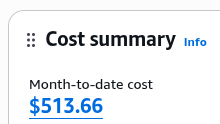
I’m trying to post metrics for the current balance. The balance in the current account is 513.66 . The suggestions I found online were variations of this with the same result:

$ aws ce get-cost-and-usage --time-period Start=2026-05-01,End=2026-06-01 --granularity MONTHLY --metrics "UnblendedCost" --query 'ResultsByTime[0].Total.UnblendedCost.Amount' --output text
-0.0000001087

The response is typically 0.0, plus/minus some degree of tiny floating-point error.

Clicking on the amount in the Console…:

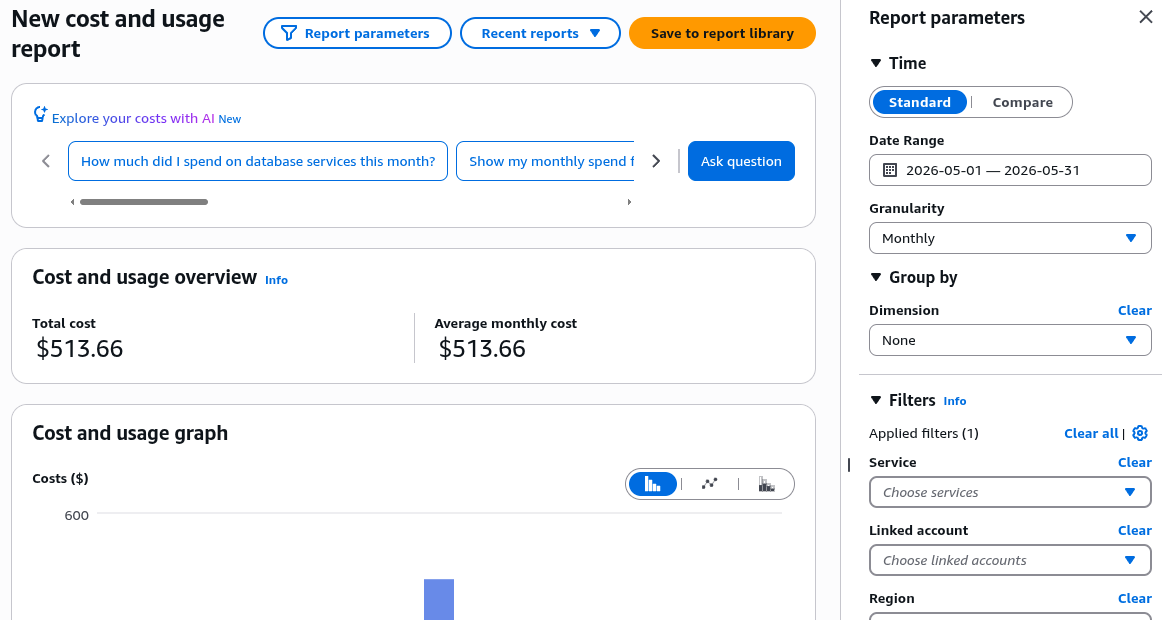
…will take you to the actual reporting screen:

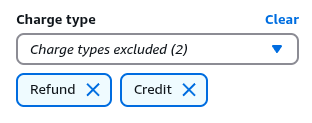
Looking at the filters, it shows that “(1)” was applied. Interesting. Expanding the extra filters at the bottom, it suddenly shows some excluded items under “Charge type”:

This ended-up being the culprit. It’s not clear how this influences the results since I also calculated month-to-date balance values for every day of the present month, and they were all near zero regardless. However, accounting for this at the CLI finally produced a matching balance (using the --filter parameter):

$ aws ce get-cost-and-usage --time-period Start=2026-05-01,End=2026-06-01 --granularity MONTHLY --metrics "UnblendedCost" --query 'ResultsByTime[0].Total.UnblendedCost.Amount' --output text --filter '{"Not":{"Dimensions":{"Key":"RECORD_TYPE","Values":["Credit","Refund"]}}}'
513.6641476331

For completeness, this is the corresponding Python script for retrieving the same thing with Boto:

import boto3
cost_explorer_client = boto3.client("ce")
get_cost_and_usage_response = cost_explorer_client.get_cost_and_usage(
TimePeriod={
"Start": "2026-05-01",
"End": "2026-06-01",
},
Granularity="MONTHLY",
Metrics=["UnblendedCost"],
Filter={
"Not": {
"Dimensions": {
"Key": "RECORD_TYPE",
"Values": ["Credit", "Refund"],
},
},
},
)
results_by_time_rows = get_cost_and_usage_response["ResultsByTime"]
first_result_row = results_by_time_rows[0]
total_block = first_result_row["Total"]
unblended_cost_block = total_block["UnblendedCost"]
print(unblended_cost_block["Amount"])

Connecting an LLM CLI to N8N On a Private Network Using n8n-mcp

The “n8n-mcp” MCP by default restricts access to a local, private network. This is an example of a config template that allows for it:

{
"mcpServers": {
"n8n-mcp": {
"command": "npx",
"args": ["n8n-mcp"],
"env": {
"MCP_MODE": "stdio",
"LOG_LEVEL": "error",
"DISABLE_CONSOLE_OUTPUT": "true",
"N8N_API_URL": "http://192.168.10.5:55678",
"N8N_API_KEY": "<API key>",
"WEBHOOK_SECURITY_MODE": "permissive"
}
}
}
}

We have an SSH connection from the remote N8N system (in another part of the world) to a local server (managed by autossh), with :55678 bound to 0.0.0.0 on our local server and forwarded back to :5678 on the remote one. The MCP on our local system talks to :55678 on our local server.

Programmatically Retrieving the Inode For a File In Linux

ls uses the stat structure to provide this information via ls -i. Therefore, it should be available via any programming language whose stat implementation passes this information through:

$ ls -i .bashrc
18731977 .bashrc
$ python
>>> import os
>>> s = os.stat('.bashrc')
>>> s.st_ino
18731977

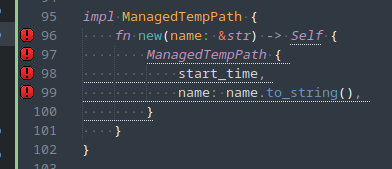
Reduce Rust Verbosity In Sublime

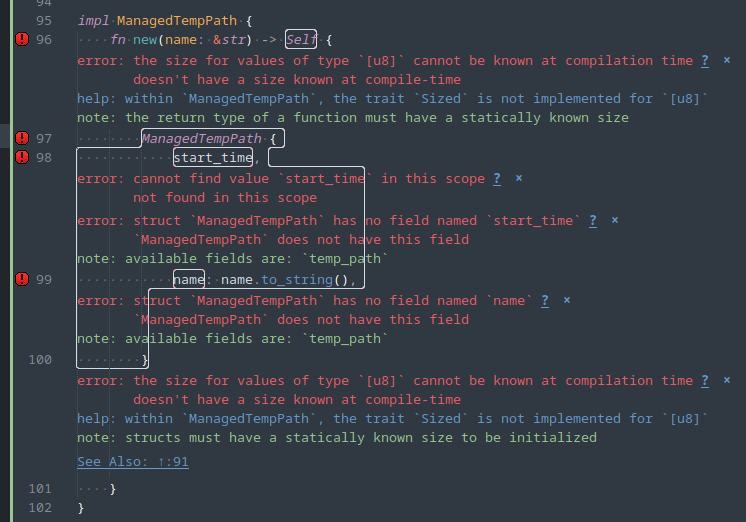
The “Rust Enhanced” Sublime package is extremely noisy (“fruit salad”) with its syntax checks, by default:

To reduce the amount of this noise, I use these settings:

{
    "rust_syntax_hide_warnings": true,
    "rust_message_status_bar": true,
    "rust_region_style": "stippled_underline",
    "rust_phantom_style": "none",
}

..which results in:

This is much less intrusive. However, you’ll have to run a manual build and look in the bottom panel for the error messages as the markers in the gutter don’t expose them. This should be, at least, less intrusive for most developers.

Register New Executable Formats In The Linux Kernel

If the kernel identifies that a file you’re trying to execute has a known sequence of magic bytes, it will happily execute it. However, you might want to run certain formats without needing to pass them to another tool. In as much as these are usually binary tools, you can prepend a magic-bytes preamble (or use an existing sequence, if your binary format already declares one) and then associate that with a certain loader in the running kernel using binfmt_misc. Access is usually via procfs (currently /proc/sys/fs/binfmt_misc/register). Cross-execution with a virtualized process is a common use-case for this.

Note that this doesn’t really apply to text files (it’s all data) because you’d need to inject gibberish at the top of your file to use this functionality when using a shebang (which is meant for this case) should work just fine.

This is a walkthrough of how to do this for compiled Python or LUA source-code: https://twdev.blog/2024/01/docker_multi_platform

Since both of the example compilation formats include magic bytes, you can just write a tool to acquire those from libraries (at least with Python) and call binfmt_misc in one step.

You can also write configs to be automatically loaded at boot. There appears to be no way to list registered formats, with the only recourse being to sift the config paths (probably empty by default) or to check your kernel config to see which supported formats were included in that build.

Embedding Python in PostgreSQL Functions

Example:

CREATE OR REPLACE FUNCTION url_quote (url text)
RETURNS TEXT
AS $$
    from urllib.parse import quote
    return quote(url)

$$
LANGUAGE 'plpython3u';

SELECT url_quote('https://www.postgresql.org/docs/12/plpython-data.html#id-1.8.11.11.3');

Getting Started with Postgres Functions in PL/Python

How to Render Django Templates Without Loading Django (or Its Configuration System)

#!/usr/bin/env python3

import django.template
import django.template.engine

def _main():
    e = django.template.engine.Engine()

    body = """\
aa {{ test_token }} cc
"""

    t = django.template.Template(body, engine=e)

    context = {
        'test_token': 'bb',
    }

    c = django.template.Context(context)
    r = t.render(c)

    print(r)


_main()

Output:

$ ./test_render.py 
aa bb cc

Python: Substitute Values Into YAML During Load

There’s definitely a case to be made for automatically and efficiently applying environment variables or another set of replacements into a YAML-based config or set of instructions on load. This example uses PyYAML. We’ll use Python’s built-in string templating to replace tokens like “$NAME” with values from a dictionary. It will fail, as it should, if the name is not in the given dictionary.

import string
import yaml

def load_yaml(f, context):

    def string_constructor(loader, node):

        t = string.Template(node.value)
        value = t.substitute(context)

        return value


    l = yaml.SafeLoader
    l.add_constructor('tag:yaml.org,2002:str', string_constructor)

    token_re = string.Template.pattern
    l.add_implicit_resolver('tag:yaml.org,2002:str', token_re, None)

    x = yaml.load(f, Loader=l)
    return x

y = """\
aa: bb
cc: dd $EE ff
"""

context = {
    'EE': '123',
}

d = waw.utility.load_yaml(y, context)
print(d)

Output:

{'aa': 'bb', 'cc': 'dd 123 ff'}