Using ssl.wrap_socket for Secure Sockets in Python

Ordinarily, the prospect of having to deal with SSL-encrypted sockets would be enough to make the best of us take a long weekend. However, Python provides some prepackaged functionality to accommodate this. It’s called “wrap_socket”. The only reason that I ever knew about this was from reverse engineering, as I’ve never come upon this in a blog/article.

Here’s an example. Note that I steal the CA bundle from requests, for the purpose of this example. Use whichever bundle you happen to have available (they should all be relatively similar, but will generally be located different places on your system, depending on your OS/distribution).

import ssl
import socket

s_ = socket.socket(socket.AF_INET, socket.SOCK_STREAM)
s = ssl.wrap_socket(s_, 
                    ca_certs='/usr/local/lib/python2.7/dist-packages/requests/cacert.pem', 
                    cert_reqs=ssl.CERT_REQUIRED)

s.connect(('www.google.com', 443))

# s.cipher() - Returns a tuple: ('RC4-SHA', 'TLSv1/SSLv3', 128)
# s.getpeercert() - Returns a dictionary: 
#
#   {'notAfter': 'May 15 00:00:00 2014 GMT',
#    'subject': ((('countryName', u'US'),),
#                (('stateOrProvinceName', u'California'),),
#                (('localityName', u'Mountain View'),),
#                (('organizationName', u'Google Inc'),),
#                (('commonName', u'www.google.com'),)),
#    'subjectAltName': (('DNS', 'www.google.com'),)}

s.write("""GET / HTTP/1.1\r
Host: www.google.com\r\n\r\n""")

# Read the first part (might require multiple reads depending on size and 
# encoding).
d = s.read()
s.close()

Obviously, your data sits in d, after this code runs.

Using etcd as a Clusterized, Immediately-Consistent Key-Value Storage

The etcd project was one of the first popular, public platforms built on the Raft algorithm (a relatively simple consensus algorithm, used to allow several nodes to remain in sync). Raft represents a shift away from its predecessor, Paxos, which is considerably more difficult to understand, and usually requires shortcuts to implement. As an added bonus, etcd is also implemented in Go.

etcd looks and smells like every other KV store, with three especially-notable differences:

  • You can maintain a heirarchy of keys.
  • You can long-poll for changes on keys.
  • Distributed-locks are built-in.

We’re going to use Python’s etcd package (project is here). This package presents a very intuitive interface that completely manages responses from the server and is built in such a way that future API changes should be backward-compatible (to within reason). These things are important, as other clients have historically allowed the application too much direct access to the actual server requests, and left too much of the interpretation of the responses to the application as well.

To connect the client (assuming the same machine with the default port):

from etcd import Client

c = Client()

To set a value:

c.node.set('/test/key', 5)

To get a value:

r = c.node.get('/test/key')
print(r.node.value)

Which outputs:

5

To wait on a value to change, run this from another terminal:

r = c.node.wait('/test/key')

Try setting the node to something else using a command similar to before. The wait call will return with the same result as the instance of the client that actually made the request.

To work with distributed locks, just wrap the code that needs to be synchronized in a with statements:

with c.module.lock.get_lock('test_lock_1', ttl=10):
    print("In lock 1.")

It’s worth mentioning that the response objects have a consistent and informative interface no matter what the operation. You can see a number properties just by printing it. This is from the set operation above:

<RESPONSE: <NODE(ResponseV2AliveNode) [set] [/test/key] IS_HID=[False] IS_DEL=[False] IS_DIR=[False] IS_COLL=[False] TTL=[None] CI=(2) MI=(2)>>

This is from the get operation:

<RESPONSE: <NODE(ResponseV2AliveNode) [get] [/test/key] IS_HID=[False] IS_DEL=[False] IS_DIR=[False] IS_COLL=[False] TTL=[None] CI=(2) MI=(2)>>

I’ll omit the examples of working with heirarchical keys because the functionality is every bit as intuitive as it should be.

There’s a lot of functionality in the Python etcd package, but it’s built to be lightweight and obvious. The GitHub page is extremely thorough, and the API is also completely documented at ReadTheDocs.

Custom GIT Subcommands

At some point, you might find yourself running the same sequence of git operations on a regular basis. It would greatly improve your efficiency to stash these commands into your own Git subcommand.

For example, I could create a script named “git-dustin”:

#!/bin/sh

echo "Dustin's subcommand: $1"

Then, I’d save it into /usr/local/bin (in order to be in the path), and mark it as executable. I can then access it as if it were a subcommand:

$ git dustin "test argument"

This is the output:

Dustin, subcommand: test argument

Environment Variables Under SSH

It’s a fairly important point that if you want to define global environment variables on an Ubuntu host that will be accessible from a command executed via SSH, OpenSSH provides few options and most blogs will give users incorrect advice.

It turns out that adding variables to /etc/profile or /etc/profile.d/* is patently incorrect.

If you want to add an environment variable that any script for any user can see when executed via SSH (“ssh <user>@<host> <command>“), add it to /etc/environment. It’s similar to ~/.ssh/environment (if that’s turned-on with PermitUserEnvironment), but global.

Using Nginx for Long-Polling (Comet)

Long-polling is the strategy of checking for updates or messages from a server by allowing a client to connect but block until data is available. Once data is available, the client processes the data and reads again, potentially blocking again. This is considerably more efficient, in all of the ways that blocking is when compared with polling regularly in the absence of data.

Although it’s not complicated to implement this on your own, it can potentially introduce complexity to what might otherwise be a simple website. For example, to implement this, you might have to provide the following features yourself:

  • Server process that manages messaging.
  • A connection-management framework to maintain a dictionary of mailboxes to a list of their corresponding waiting connections.
  • Providing for the necessary accounting if you want to queue the incoming messages, so reoccurring clients won’t miss any, and then providing the ability for clients to determine what messages have already been seen.
  • All of the required thread-safety for managing connections and message exchange.

Enter the all-powerful, all-seeing, all-caching Nginx web-server. It has a couple of modules that reduce the factors above down to a couple of API calls to Nginx: HttpStreamPushModule and HttpPushModule.

Though HttpStreamPushModule is, reportedly, the latest of the two modules, only HttpPushModule is available with Ubuntu (as of 13.04). So, that’s the one that we’ll work with, here.


Nginx Configuration

To install the HttpPushModule module, install nginx-extras (again, as of 13.04).

Configuration is very straightforward. We’ll define two location blocks: one for publishers and one for subscribers. In the common scenario, the publisher will be what your application code pushes messages to and the subscriber will be what your Javascript reads from (which will regularly block). When publisher and subscriber requests are received, Nginx will expect an ID to indicate which “channel” should be used. A channel is just another name for a mailbox, and, by default, doesn’t have to already exist.

The endpoints defined in our example (taken from here):

location /publish {
    set $push_channel_id $arg_id;      # The channel ID is expected as "id".
    push_publisher;

    push_store_messages on;            # enable message queueing
    push_message_timeout 2h;           # messages expire after 2 hours, set to 0 to never expire
    push_message_buffer_length 10;     # store 10 messages
}

location /subscribe {
    push_subscriber;

    # Any number of clients can listen.
    push_subscriber_concurrency broadcast;

    set $push_channel_id $arg_id;
    default_type  text/plain;
}


Javascript Code

In our simple example, we’ll play the parts of both the publisher and subscriber. We’ll wait on messages from the subscriber endpoint, while allowing the user to publish messages into the publisher endpoint.

The example also accounts for which messages are too old. If we were to just naively start reading messages, two things will happen:

  • We’ll see the first message that Nginx has knowledge of, for the given channel.
  • We’ll see the same message repeatedly.

What’s happening here is that Nginx relies on the client to keep track of what messages it has already seen, so, unless given parameters, Nginx will always start at the beginning.

Our Javascript takes care of this. On each request, we grab the values of the “Etag” and “Last-Modified” response headers, and pass them into future requests as the “If-None-Match” and “If-Modified-Since” request headers, respectively. Notice that if we were to set the initial value of the last-modified timestamp to the epoch (the early midnight of New Years, 1970, GMT), we’d initially receive all queued messages. We chose to set it to the “now” timestamp so that we’d only see messages from the point that we loaded the webpage.

That’s all.

Example (based on the same reference, above, but refactored for jQuery):

<html>
<head> 
    <script src="http://code.jquery.com/jquery-1.10.1.min.js"></script>
    <script type="text/javascript">
var channelId = "asdf";

// We use these to tell Nginx which messages we've seen.
var etag = 0;
var lm = (new Date()).toGMTString();

function add_message(msg) {
     var d = new Date();
     var msg = d.toString() + ": " + msg;
     $('#data').append(msg + "<br />");
}

function do_request() {
    add_message("Doing long-poll: (" + etag + ") [" + lm + "]");
    $.ajax('/subscribe?id=' + channelId, {
            type: 'GET',
            success: handle_response,
            error: handle_error,
            headers: {
                    'If-None-Match': etag,
                    'If-Modified-Since': lm
                }
        });
    }

function handle_response(txt, textStatus, response) {
     add_message('Long-poll has returned.');
     add_message(txt);
     
     etag = response.getResponseHeader("Etag") || 0;
     lm = response.getResponseHeader("Last-Modified") || lm;
    
     do_request();
}

function handle_error(response, textStatus, errorThrown) {
     add_message(errorThrown);
}

function publish_message() {
    var txt = $.trim($('#message').val());
    if (txt.length == 0)
        alert("You must enter text to publish");
    else
        $.post('/publish?id=' + channelId, {
                data: txt
            });
}
    </script>
</head>
<body>
    Messages:
    <div id="data">
    </div>

    <input type="text" id="message" />
    <input type="button" id='send' value="Send Message" />
</body>
</html>
<script type="text/javascript">
function boot_page()
{
    $('#send').click(publish_message);
    do_request();
}

$(boot_page);
</script>

Use TightOCR for Easy OCR from Python

When it comes to recognizing documents from images in Python, there are precious few options, and a couple of good reasons why.

Tesseract is the world’s best OCR solution, and is currently maintained by Google. Unlike other solutions, it comes prepackaged with knowledge for a bunch of languages, so the machine-learning aspects of OCR don’t necessarily have to be a concern of yours, unless you want to recognize for an unknown language, font, potential set of distortions, etc…

However, Tesseract comes as a C++ library, which basically takes it out of the running for use with Python’s ctypes. This isn’t a fault of ctypes, but rather of a lack of standardization in symbol-naming among the C++ compilers (there’s no way to know how to determine the naming for a symbol in the library from Python).

There is an existing Python solution, which comes in the form of a very heavy Python wrapper called python-tesseract, which is built on SWIG. It also requires a couple of extra libraries, like OpenCV and numpy, even if you don’t seem to be using them.

Even if you decide to go the python-tesseract route, you will only have the ability to return the complete document as text, as their support for iteration through the parts of the document is broken (see the bug).

So, with all of that said, we accomplished lightweight access to Tesseract from Python by first building CTesseract (which produces a C wrapper for Tesseract.. see here), and then writing TightOCR (for Python) around that.

This is the result:

from tightocr.adapters.api_adapter import TessApi
from tightocr.adapters.lept_adapter import pix_read
from tightocr.constants import RIL_PARA

t = TessApi(None, 'eng');
p = pix_read('receipt.png')
t.set_image_pix(p)
t.recognize()

if t.mean_text_confidence() < 85:
    raise Exception("Too much error.")

for block in t.iterate(RIL_PARA):
    print(block)

Of course, you can still recognize the document in one pass, too:

from tightocr.adapters.api_adapter import TessApi
from tightocr.adapters.lept_adapter import pix_read
from tightocr.constants import RIL_PARA

t = TessApi(None, 'eng');
p = pix_read('receipt.png')
t.set_image_pix(p)
t.recognize()

if t.mean_text_confidence() < 85:
    raise Exception("Too much error.")

print(t.get_utf8_text())

With the exception of renaming “mean_text_conf” to “mean_text_confidence”, the library keeps most of the names from the original Tesseract API. So, if you’re comfortable with that, you should have no problem with this (if you even have to do more than the above).

I should mention that the original Tesseract library, though a universal and popular OCR solution, is very dismally documented. Therefore, there are many functions that I’ve left scaffolding for in the project, without being entirely sure how to use/test them nor having any need for them myself. So, I could use help in that area. Just submit issues or pull-requests if you want to contribute.

Using the “Tig” Git Console UI

At its simplest, Tig allows you to navigate your Git projects from the console (it internally invokes commands to git). It has nearly all of the browsing functionality of Github while readily running locally. At it’s most-complicated, it looks to be as flexible as Git itself.

The two simplest ways to run Tig (from within our Git project):

  • Piping: git log | tig
  • Calling directly: tig

In the case of piping, you’re really just benefiting by coloring the output and pumping it through pagination. If you’re going to call Tig directly, the experience will be more interactive. The default “view” is the log.

You can also specify other views:

$ tig -h
tig 1.2.1 (Nov 29 2013)

Usage: tig        [options] [revs] [--] [paths]
   or: tig log    [options] [revs] [--] [paths]
   or: tig show   [options] [revs] [--] [paths]
   or: tig blame  [options] [rev] [--] path
   or: tig stash
   or: tig status
   or: tig <      [git command output]

Options:
  +<number>       Select line <number> in the first view
  -v, --version   Show version and exit
  -h, --help      Show help message and exit

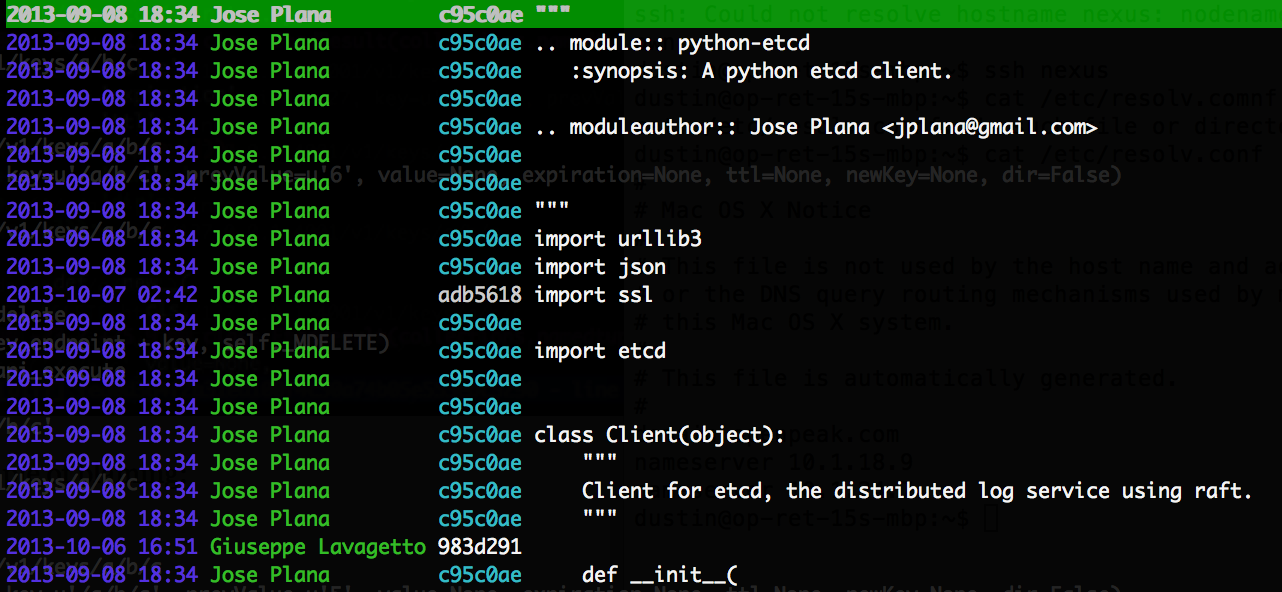
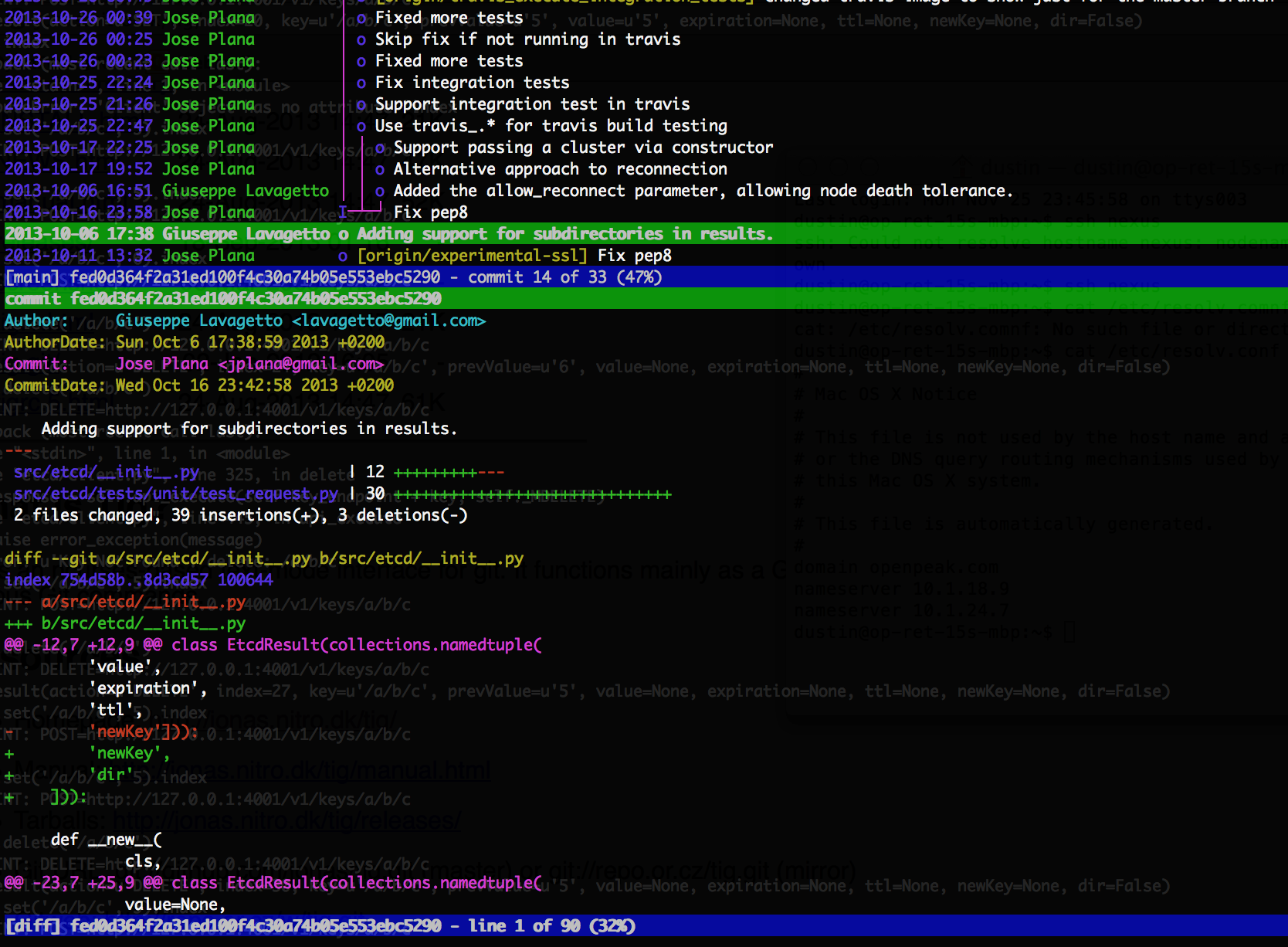
An example of the commit browser. I’ve clicked on a commit to show its diffs:

Git "Tig" Commit Browser

An example of blaming:

Git "Tig" Blame Browser
For more information:

Screenshots
Manual

Using etcd as a Highly Available and Innovative Key-Value Storage

etcd was created as the primary building-block on which CoreOS is built. It uses the Raft algorithm to keep changes consistent throughout a cluster by electing a leader and distributing a log of operations (“commands”) from the leader to the other systems. Due to these features and others, etcd to be used for robust service-discovery and cluster configuration, replacing ZooKeeper. Entries are referred-to as “nodes”.


Distributed Locks

Every update automatically increments the “index”, which is a global, monotonically-increasing value, incremented for every operation:

c.set('/a/b/c', 5).index
# 66
c.set('/a/b/c', 5).index
# 67

The index increases for every operation, not just those with side-effects. Per the mailing list (2013-11-29), the reason for this is:

That’s a side effect of how Raft works. When new commands come in they get sent to Raft immediately which increments the index. We’re not able to check the current value of the key before insert because Raft batches commands so there may be uncommitted changes between the current state and the state at the time when the command is being committed. That’s also why changes that cause errors can increment the index even though no change was made.

etcd also gives us a “CAS” (“compare and swap”) call (“test_and_set” in the Python client). This allows us to assign a value to a key, but only when the existing value meets one or more conditions:

  1. The existing value is set to something specific (a “previous value” condition).
  2. The existing index is set to something specific (a “previous index” condition).
  3. The key either currently exists or doesn’t (a “previously exists” condition).

The existence of a monotonic, atomic counter and a CAS function happen to be the exact dependencies required to establish distributed locking. The process might be the following:

  1. Initialize a node for the specific lock (“lock node”). Use CAS with a “prevExists” of “false” and a value of “0”.
  2. Assign some value to some dummy key used for the purpose of incrementing and grabbing the index. This index will be used as a unique ID for the current thread/instance (“instance ID”).
  3. Do a CAS on the lock node with a “prevValue” of “0”, a value of the instance-ID, and a TTL of whatever maximum lock time we should allow.
    • If error, watch the lock node. Give the HTTP client a timeout. Try again after long-polling returns or timeout hits.
    • If no error, do whatever logic is required, and, to release, use a CAS to set the lock-node to “0” with a “prevValue” of the instance-ID. If this fails (ValueError), then the lock has been reowned by another instance after having timed-out.

It’s important to mention that the “test_and_set” operation in the Python client only currently supports the “prevValue” condition. With the “prevValue” condition, you’ll get a KeyError if the key doesn’t exist. If the real existing value does not match the stated existing value, you’ll get a ValueError (which is a standard consideration when using this call).


Additional Features

Aside from being so consistent and having easy access to the operations via REST, there are two non-traditional operations that you’ll see with etcd but not with [most] other KV solutions:

  1. Entries can be stored in a hierarchy
  2. Long-polling to wait on a change to a key or folder (“watch”)

With (2), you can monitor a key that doesn’t yet exist, or even a folder (in which case, it’ll block until any value inside the folder changes, recursively). You can use this to achieve event-driven scripts (a neat usage mentioned on the mailing list).

Lastly, before moving on to the example, the cluster should be kept small:

Every command the client sends to the master is broadcast to all of the 
followers. The command is not committed until the majority of the cluster peers 
receive that command.

Because of this majority voting property, the ideal cluster should be kept 
small to keep speed up and be made up of an odd number of peers.

(what size cluster should I use)

etcd is based on Google’s Chubby (which uses Paxos rather than Raft).


Quick Start

For this example, we’re going to establish and interact with etcd using three different terminals on the same system. etcd requires Go 1.1+. You’ll probably have to build it (via a “Git” clone call, and a build), as it’s not yet available via many package managers (Ubuntu, specifically).

Run etcd:

$ etcd
[etcd] Nov 28 13:02:20.849 INFO      | Wrote node configuration to 'info'
[etcd] Nov 28 13:02:20.849 INFO      | etcd server [name default-name, listen on 127.0.0.1:4001, advertised url http://127.0.0.1:4001]
[etcd] Nov 28 13:02:20.850 INFO      | raft server [name default-name, listen on 127.0.0.1:7001, advertised url http://127.0.0.1:7001]

Creating a cluster is as easy as simply launching additional instances of the daemon on new hosts. Now, install Python’s python-etcd:

sudo pip install python-etcd

Connect the client:

from etcd import Client
c = Client(host='127.0.0.1')

Set a value (notice that we have to specify a folder, even if it’s only the root):

c.set('/test_entry', 'abc')

EtcdResult(action=u'SET', index=9, key=u'/test_entry', prevValue=None, value=u'abc', expiration=None, ttl=None, newKey=True)
# Actions available on EtcdResult: action, count, expiration, index, key, newKey, prevValue, ttl, value

Get the value:

r = c.get('/test_entry')
print(r.value)
# Prints "abc"

In a second terminal, connect the client and run the following to block for a change to the given folder (it doesn’t currently exist):

r = c.watch('/test_folder')

Back in the first terminal, run:

c.set('/test_folder/test_inner_folder/deep_test', 'abc')

The command waiting in the second terminal has now returned. Examine “r”:

print(r)
EtcdResult(action=u'SET', index=15, key=u'/test_folder/test_inner_folder/deep_test', prevValue=None, value=u'abc', expiration=None, ttl=None, newKey=True)

Get a listing of children. This may or may not work on “/”, depending on your python-etcd version:

from pprint import pprint
c.set('/test_folder/entry_1', 'test_value_1')
c.set('/test_folder/entry_2', 'test_value_2')
list_ = c.get('/test_folder')
pprint(list_)
#[EtcdResult(action=u'GET', index=4, key=u'/test_folder/entry_1', prevValue=None, value=u'test_value_1', expiration=None, ttl=None, newKey=None),
# EtcdResult(action=u'GET', index=4, key=u'/test_folder/entry_2', prevValue=None, value=u'test_value_2', expiration=None, ttl=None, newKey=None)]

etcd also allows for TTLs (in seconds) on “put” operations:

from time import sleep
c.set('/disappearing_entry', 'inconsequential_value', ttl=5)
sleep(5)
c.get('/disappearing_entry')

You’ll get the following error (a proper KeyError):

Traceback (most recent call last):
  File "", line 1, in 
  File "/Library/Python/2.7/site-packages/etcd/client.py", line 284, in get
    response = self.api_execute(self.key_endpoint + key, self._MGET)
  File "/Library/Python/2.7/site-packages/etcd/client.py", line 357, in api_execute
    raise error_exception(message)
KeyError: u'Key Not Found : get: /disappearing_entry'

Miscellaneous functions:

c.machines
# ['http://127.0.0.1:4001']
c.leader
# 'http://127.0.0.1:7001'

As a final note, you don’t have to choose between cURL requests and the API. Rather, there’s also etcdctl for command-line control:

$ etcdctl set /foo/bar "Hello world"
Hello world


FAQ

Leaders are elected using elections. However, there’s a chance that a leader won’t be elected, and the elections will have to be reattempted. From the mailing list (2013-11-29):

Q: What would cause a leader candidate to not receive a majority of votes from nodes, during elections?
A: The common case election failure would be due to either a network partition causing less than a quorum to vote, or another candidate being elected first.

Q: Is there any decision-making involved during elections, such as the consideration of the CPU utilizations of individual machines?
A: Not at this time. It might make sense to add some sort of fitness to the leader proposal decision later.

Using Bitly’s NSQ Job Queue

I’ve recently been impressed by Bitly’s NSQ server, written in Go. Aside from the part about Go capturing my attention, the part that most interested me was 1) they claim that it achieves 90,000 messages/second (which is decent), and 2) it’s relatively easy to set-up, and it’s self-managing.

The topology for NSQ is straight forward: N queue servers (nsqd), 0+ lookup servers (nsqlookupd), and an optional admin (dashboard) server (nsqadmin). The lookup servers are optional, but they allow auto-discovery of which hosts are managing which topics. Bitly recommends that a cluster of three are used in production. To start multiple instances, just launch them. You’ll have to pass in a list of nsqlookupd hosts to the consumer client, and a list of nsqd hosts to the producer client.

The message pipeline is intuitive: messages are pushed along with topics/classifiers, and consumers listen for topics and channels. A channel is a named grouping of consumers that work on similar tasks, where the “channel” is presented as a string to the consumer instance. NSQ uses the concepts of topics and channels to drive multicast and distributed delivery.

As far as optimization goes, there are about three dozen parameters for nsqd, but you need not concern yourself with most of them, here.

This example resembles the one from the NSQ website, plus some additional info. All four processes can be run from the same system.

Quick Start

Get and build the primary components. $GOPATH needs to either be set to your Go workspace (mine is ~/.go, below), or an empty directory that will be used for it. $GOPATH/bin needs to be in the path.

go get github.com/kr/godep

godep get github.com/bitly/nsq/nsqd
godep get github.com/bitly/nsq/nsqlookupd
godep get github.com/bitly/nsq/nsqadmin

To start, run each of the following services in a different terminal on the same system.

A lookup server instance:

nsqlookupd

A queue instance:

nsqd --lookupd-tcp-address=127.0.0.1:4160

An admin server instance:

nsqadmin --template-dir=~/.go/src/github.com/bitly/nsq/nsqadmin/templates --lookupd-http-address=127.0.0.1:4161

To push test-items:

curl -d 'hello world 1' 'http://127.0.0.1:4151/put?topic=test'
curl -d 'hello world 2' 'http://127.0.0.1:4151/put?topic=test'
curl -d 'hello world 3' 'http://127.0.0.1:4151/put?topic=test'

The “apps” aren’t built, apparently, by default. We’ll need these so we can get a message-dumper, for testing:

~/.go/src/github.com/bitly/nsq$ make
cd build/apps

To dump data that’s already waiting in the queues:

./nsq_to_file --topic=test --output-dir=/tmp --lookupd-http-address=127.0.0.1:4161

Display queue data:

cat /tmp/test.*.log
hello world 1
hello world 2
hello world 3

Python Library

Matt Reiferson wrote pynsq, which is a Python client that employs Tornado for it’s message-loops. The gotcha is that both the consumers -and- producers both require you to use IOLoop, Tornado’s message-loop. This is because pynsq not only allows you to define a “receive” callback, but a post-send callback as well. Though you don’t have to define one, there is an obscure, but real, chance that a send will fail, per Matt, and should always be checked for.

Because of this design, you should be prepared to put all of your core loop logic into the Tornado loop.

To install the client:

sudo pip install pynsq tornado

A producer example from the “pynsq” website:

import nsq
import tornado.ioloop
import time

def pub_message():
    writer.pub('test', time.strftime('%H:%M:%S'), finish_pub)

def finish_pub(conn, data):
    print data

writer = nsq.Writer(['127.0.0.1:4150'])
tornado.ioloop.PeriodicCallback(pub_message, 1000).start()
nsq.run()

An asynchronous consumer example from the “pynsq” website (doesn’t correspond to the producer example):

import nsq

buf = []

def process_message(message):
    global buf
    message.enable_async()
    # cache the message for later processing
    buf.append(message)
    if len(buf) >= 3:
        for msg in buf:
            print msg
            msg.finish()
        buf = []
    else:
        print 'deferring processing'

r = nsq.Reader(message_handler=process_message,
        lookupd_http_addresses=['http://127.0.0.1:4161'],
        topic='nsq_reader', channel='async', max_in_flight=9)
nsq.run()

Give it a try.

FAQ

(Courtesy of a dialogue with Matt Reiferson)

Q: Most job-queues allow you send messages without imposing a loop. Is the 
   IOLoop required for both receiving -and- sending in pynsq?
A: Yes. pynsq supports the notion of completion-callbacks to signal when a send 
   finishes. Even if you don't use it, it's accounted-for in the mechanics. If 
   you want to send synchronous messages without the loop, hit the HTTP 
   endpoint. However, facilitating both the receive and send IOLoops allows for 
   the fasted possible dialogue, especially when the writers and readers are 
   paired to the same hosts.

Q: An IOLoop is even required for asynchronous sends?
A: Yes. If you want to simply send one-off asynchronous messages, 
   consider opening a worker process that manages delivery. It can apply its 
   own callback to catch failures, and transmit successes, failures, etc.. to 
   an IPC queue (if you need this info).

Q: Are there any delivery guarantees (like in ZeroMQ)?
A: No. It's considered good-practice by the NSQ guys to always check the 
   results of message-sends in any situation (in any kind of messaging, in 
   general). You'd do this from the callbacks, with pynsq.

    The reasons that a send would fail are the following:

    1: The topic name is not formatted correctly (to character/length 
       restrictions). There is no official documentation of this, however.
    2: The message is too large (this can be set via a parameter to nsqd).
    3: There is a breakdown related to a race-condition with a publish and a 
       delete happening on a specific topic. This is rare.
    4: Client connection-related failures.

Q: In scenario (3) of the potential reasons for a send-failure, can I mitigate 
   the publish/delete phenomena if I am either not deleting topics or have 
   orchestrated deletions such that writes eliciting topic creations will never 
   be done until a sufficient amount of time has elapsed since a deletion?
A: Largely. Though, if nowhere else, this can also happen internally to NSQ at 
   shutdown.

Q: How are new topics announced to the cluster?
A: The first writer or reader request for a topic will be applied on the 
   upstream nsqd host, and will then propagate to the nsqlookupd hosts. They will 
   eventually spread to the other readers from there. The same thing applies to 
   a new topic, as well as a previously-deleted one.

Manager Namespaces for IPC Between Python Process Pools

Arguably, one of the functionalities that best represent why Python has so many multidisciplinary uses is its multiprocessing library. This library allows Python to maintain pools of processes and communication between these processes with most of the simplicity of a standard multithreaded application (asynchronously invoking a function, locking, and IPC). This is not to say that Python can’t do threads, too, but, due to being able to quickly run map/reduce operations or asynchronous tasks using a very simple set of functions combined with the disadvantages of having to consider the GIL when doing multithreaded development, I believe the multiprocess design to be more popular by a landslide.

There are mountains of examples for how to use multiprocessing, along with sufficient documentation for most of the IPC mechanisms that can be used to communicate between processes: queues, pipes, “manager”-based shares and proxy objects, shared ctypes types, multiprocessing-based “client” and “listener” sockets, etc..

There is a very subtle IPC mechanism called a “namespace” (which is actual part of Manager), whose presence in the documentation only speaks for a couple of lines of the thousands that are there. It’s easy, and worth special mention.

from multiprocessing import Pool, Manager
from os import getpid
from time import sleep

def _worker(ns):
    pid = getpid()
    print("%d: Worker started." % (pid))

    while ns.is_running is True:
        sleep(1)

    print("%d: Worker terminating." % (pid))

m = Manager()
ns = m.Namespace()
ns.is_running = True

num_workers = 5
p = Pool(num_workers)

for i in xrange(num_workers):
    p.apply_async(_worker, (ns,))

sleep(10)
print("Shutting down.")

ns.is_running = False
p.close()
p.join()

print("All workers joined.")

The output:

52893: Worker started.
52894: Worker started.
52895: Worker started.
52896: Worker started.
52897: Worker started.
Shutting down.
52894: Worker terminating.
52893: Worker terminating.
52895: Worker terminating.
52896: Worker terminating.
52897: Worker terminating.
All workers joined.

A namespace is very much like a bulletin board, where attributes can be assigned by one process, and read by others. This works for immutable values like strings and primitive types. Otherwise, updates can’t be tracked properly:

from multiprocessing import Manager

m = Manager()
ns = m.Namespace()

ns.test_value = 'original value'
ns.test_list = [5]

print("test_value (master, original): %s" % (ns.test_value))
print("test_list (master, original): %s" % (ns.test_list))

ns.test_value = 'new value'
ns.test_list.append(10)

print("test_value (master, updated): %s" % (ns.test_value))
print("test_list (master, updated): %s" % (ns.test_list))

Output:

test_value (master, original): original value
test_list (master, original): [5]
test_value (master, updated): new value
test_list (master, updated): [5]

Though not working for some types, namespaces are a terrific mechanism for sharing counters and flags between processes.