Using Docker to Package and Distribute Applications as Containers

i’ve already posted a couple of articles referencing Linux’s LXC containers (see here), for lightweight process isolation and resource limiting.

Docker takes LXC and pushes the functionality to produce portable containers that can be:

  • versioned alongside your sourcecode
  • automatically built alongside binaries (using Dockerfiles)
  • published to a repository (both public and private can be used)

In this way, Docker producer application containers that will work consistently from within a variety of different environments.

The purpose of this article is to provide a very quick introduction to Docker, and a tutorial that hastily explains how to create a Python web project within an Ubuntu container, and connect to it.

Docker Daemon

Just like with LXC, a daemon runs in the background to manage the running containers. Though there exists a Docker Ubuntu repository, we use the manual process so that we can provide a more universal tutorial.

$ wget https://get.docker.io/builds/Linux/x86_64/docker-latest -O docker
--2014-02-12 01:08:01--  https://get.docker.io/builds/Linux/x86_64/docker-latest
Resolving get.docker.io (get.docker.io)... 198.41.249.135, 162.159.251.135, 2400:cb00:2048:1::a29f:fb87, ...
Connecting to get.docker.io (get.docker.io)|198.41.249.135|:443... connected.
HTTP request sent, awaiting response... 200 OK
Length: 15119491 (14M) [binary/octet-stream]
Saving to: ‘docker’

100%[==================================================================================================================>] 15,119,491  3.17MB/s   in 5.0s   

2014-02-12 01:08:07 (2.91 MB/s) - ‘docker’ saved [15119491/15119491]

$ chmod +x docker

$ sudo ./docker -d
[/var/lib/docker|9024eeb6] +job initserver()
[/var/lib/docker|9024eeb6.initserver()] Creating server
[/var/lib/docker|9024eeb6] +job init_networkdriver()
[/var/lib/docker|9024eeb6.init_networkdriver()] creating new bridge for docker0
[/var/lib/docker|9024eeb6.init_networkdriver()] getting iface addr
[/var/lib/docker|9024eeb6] -job init_networkdriver() = OK (0)
2014/02/12 01:08:27 WARNING: Your kernel does not support cgroup swap limit.
Loading containers: : done.
[/var/lib/docker|9024eeb6.initserver()] Creating pidfile
[/var/lib/docker|9024eeb6.initserver()] Setting up signal traps
[/var/lib/docker|9024eeb6] -job initserver() = OK (0)
[/var/lib/docker|9024eeb6] +job serveapi(unix:///var/run/docker.sock)
2014/02/12 01:08:27 Listening for HTTP on unix (/var/run/docker.sock)

Filling the Container

In another terminal (the first is being used by the daemon), start the Ubuntu container. We do this by passing an image-name. If this image can’t be found locally, the tool will search the public repositor[y,ies]. If the image has not yet been downloaded, it will be automatically downloaded (“pulled”).

Whereas most images will look like “/”, some images have special aliases that take the place of both. Ubuntu has one such alias (which dotCloud, the Docker people, use for development): “ubuntu”.

First, we’re going to create/start the container.

$ sudo ./docker run -i -t ubuntu /bin/bash
[sudo] password for dustin: 
Pulling repository ubuntu
9cd978db300e: Download complete 
eb601b8965b8: Download complete 
9cc9ea5ea540: Download complete 
5ac751e8d623: Download complete 
9f676bd305a4: Download complete 
511136ea3c5a: Download complete 
f323cf34fd77: Download complete 
1c7f181e78b9: Download complete 
6170bb7b0ad1: Download complete 
7a4f87241845: Download complete 
321f7f4200f4: Download complete 
WARNING: WARNING: Docker detected local DNS server on resolv.conf. Using default external servers: [8.8.8.8 8.8.4.4]

root@618cd8514fec:/# ls -l                     
total 72
drwxr-xr-x   2 root root 4096 Jan 29 18:10 bin
drwxr-xr-x   2 root root 4096 Apr 19  2012 boot
drwxr-xr-x  11 root root 4096 Feb 12 06:34 dev
drwxr-xr-x  56 root root 4096 Feb 12 06:34 etc
drwxr-xr-x   2 root root 4096 Apr 19  2012 home
drwxr-xr-x  12 root root 4096 Jan 29 18:10 lib
drwxr-xr-x   2 root root 4096 Jan 29 18:10 lib64
drwxr-xr-x   2 root root 4096 Jan 29 18:10 media
drwxr-xr-x   2 root root 4096 Apr 19  2012 mnt
drwxr-xr-x   2 root root 4096 Jan 29 18:10 opt
dr-xr-xr-x 249 root root    0 Feb 12 06:34 proc
drwx------   2 root root 4096 Jan 29 18:10 root
drwxr-xr-x   5 root root 4096 Jan 29 18:10 run
drwxr-xr-x   2 root root 4096 Jan 29 18:11 sbin
drwxr-xr-x   2 root root 4096 Mar  5  2012 selinux
drwxr-xr-x   2 root root 4096 Jan 29 18:10 srv
dr-xr-xr-x  13 root root    0 Feb 12 06:34 sys
drwxrwxrwt   2 root root 4096 Jan 29 18:10 tmp
drwxr-xr-x  10 root root 4096 Jan 29 18:10 usr
drwxr-xr-x  11 root root 4096 Jan 29 18:10 var

Now, add the dependencies for the sample Python application, and add the code.

root@618cd8514fec:/# mkdir app
root@618cd8514fec:/# cd app

root@618cd8514fec:/app# apt-get install python-pip
Reading package lists... Done
Building dependency tree... Done
The following extra packages will be installed:
  python-pkg-resources python-setuptools
Suggested packages:
  python-distribute python-distribute-doc
The following NEW packages will be installed:
  python-pip python-pkg-resources python-setuptools
0 upgraded, 3 newly installed, 0 to remove and 63 not upgraded.
Need to get 599 kB of archives.
After this operation, 1647 kB of additional disk space will be used.
Do you want to continue [Y/n]? 
Get:1 http://archive.ubuntu.com/ubuntu/ precise/main python-pkg-resources all 0.6.24-1ubuntu1 [63.1 kB]
Get:2 http://archive.ubuntu.com/ubuntu/ precise/main python-setuptools all 0.6.24-1ubuntu1 [441 kB]
Get:3 http://archive.ubuntu.com/ubuntu/ precise/universe python-pip all 1.0-1build1 [95.1 kB]
Fetched 599 kB in 26s (22.8 kB/s)
Selecting previously unselected package python-pkg-resources.
(Reading database ... 9737 files and directories currently installed.)
Unpacking python-pkg-resources (from .../python-pkg-resources_0.6.24-1ubuntu1_all.deb) ...
Selecting previously unselected package python-setuptools.
Unpacking python-setuptools (from .../python-setuptools_0.6.24-1ubuntu1_all.deb) ...
Selecting previously unselected package python-pip.
Unpacking python-pip (from .../python-pip_1.0-1build1_all.deb) ...
Setting up python-pkg-resources (0.6.24-1ubuntu1) ...
Setting up python-setuptools (0.6.24-1ubuntu1) ...
Setting up python-pip (1.0-1build1) ...

root@618cd8514fec:/app# pip install web.py
Downloading/unpacking web.py
  Downloading web.py-0.37.tar.gz (90Kb): 90Kb downloaded
  Running setup.py egg_info for package web.py
    
Installing collected packages: web.py
  Running setup.py install for web.py
    
Successfully installed web.py
Cleaning up...

root@618cd8514fec:/app# cat < app.py
> #!/usr/bin/env python2.7
> 
> import web
> 
> urls = (
>     '/', 'index'
> )
> 
> class index:
>     def GET(self):
>         return 'Hello, world!'
> 
> if __name__ == '__main__':
>     app = web.application(urls, globals())
>     app.run()
> CODE

root@618cd8514fec:/app# chmod u+x app.py 

This is the code that we used (for easy copy-and-pasting):

#!/usr/bin/env python2.7

import web

urls = (
    '/', 'index'
)

class index:
    def GET(self):
        return 'Hello, world!'

if __name__ == '__main__':
    app = web.application(urls, globals())
    app.run()

Make sure that the application starts correctly:

root@618cd8514fec:/app# ./app.py 
http://0.0.0.0:8080/

Feel free to do a cURL request to test. Afterwards, exit by doing CTRL+C, and running “exit”. We might’ve exited, but the container will still be running.

$ sudo ./docker ps -a
CONTAINER ID        IMAGE               COMMAND             CREATED             STATUS              PORTS               NAMES
618cd8514fec        ubuntu:12.04        /bin/bash           7 minutes ago       Exit 0                                  berserk_engelbart   

Commit the changes to the container (in the version-control sense). This won’t affect anything outside of your local system, yet.

$ sudo ./docker commit 618cd8514fec dsoprea/test_python_app
32278919fbe5b080a204fabc8ff430c6bdceaeb93faf5ad247a917de9e6b1f7a

Stop the container.

# sudo ./docker stop 618cd8514fec

$ sudo ./docker ps
CONTAINER ID        IMAGE               COMMAND             CREATED             STATUS              PORTS               NAMES

Now, start it, again, with port-forwarding from port :1234 on the current system to :8080 on the container.

$ sudo ./docker run -d -p 1234:8080 dsoprea/test_python_app /app/app.py
WARNING: WARNING: Docker detected local DNS server on resolv.conf. Using default external servers: [8.8.8.8 8.8.4.4]
118ba88c5fa4e4102209a5a1dd226ae6588598812bf3ffab0692e5b0766d71d3

Test it using cURL.

$ curl http://localhost:1234 && echo
Hello, world!

Publishing Your Docker Image

Now, we’ll push it up to the Docker Index, for public access (this is part is up to you). You’ll need to setup a free account, first. Here, I use my own account (“dsoprea”).

$ sudo ./docker push dsoprea/test_python_app
The push refers to a repository [dsoprea/test_python_app] (len: 1)
Sending image list

Please login prior to push:
Login against server at https://index.docker.io/v1/
Username: dsoprea
Password: 
Email: myselfasunder@gmail.com
Login Succeeded
The push refers to a repository [dsoprea/test_python_app] (len: 1)
Sending image list
Pushing repository dsoprea/test_python_app (1 tags)
511136ea3c5a: Image already pushed, skipping 
Image 6170bb7b0ad1 already pushed, skipping
Image 9cd978db300e already pushed, skipping
32278919fbe5: Image successfully pushed 
3805625219a1: Image successfully pushed 
Pushing tag for rev [3805625219a1] on {https://registry-1.docker.io/v1/repositories/dsoprea/test_python_app/tags/latest}

The image is now available at (for my account): https://index.docker.io/u/dsoprea/test_python_app/

If you actually want to do a fresh download/execution of your software, delete the local image (using the image ID).

$ sudo ./docker images
REPOSITORY                TAG                 IMAGE ID            CREATED             VIRTUAL SIZE
dsoprea/test_python_app   latest              3805625219a1        13 minutes ago      208 MB

$ sudo ./docker rmi 3805625219a1

$ sudo ./docker run -d -p 1234:8080 dsoprea/test_python_app /app/app.py
Unable to find image 'dsoprea/test_python_app' (tag: latest) locally
Pulling repository dsoprea/test_python_app
3805625219a1: Download complete 
511136ea3c5a: Download complete 
6170bb7b0ad1: Download complete 
9cd978db300e: Download complete 
32278919fbe5: Download complete 
WARNING: WARNING: Docker detected local DNS server on resolv.conf. Using default external servers: [8.8.8.8 8.8.4.4]
531e18306f437277fcf19827afde2901ee6b78cd954213b693aa8ae73f651ea0

$ curl http://localhost:1234 && echo
Hello, world!

Notice that at times we refer to the “image”, and at others we refer to the “container”. This might be clear to some and confusing to others. The image describes the template from which the container is constructed (instantiated).

Docker was built to coexist in a continuous-integration- and/or Github-type environment. There’s way more to the tool. It’d be well-worth your time to investigate it on your own, as you might find yourself integrating it into your development or deployment processes. Imagine automatically creating drop-in solutions alongside all of your projects, that you can publish with the ease of a version-control push.
Using AUFS to Combine Directories (With AWESOME Benefits)

A stackable or unification filesystem (referred to as a “union” filesystem) is one that combines the contents of many directories into a single directory. Junjiro Okajima’s AUFS (“aufs-tools”, under Ubuntu) is such an FS. However, there are some neat attributes that tools, such as Docker, take advantage of, and this is where it really gets interesting. I’ll discuss only one such feature, here.

AUFS has the concept of “branches”, where each branch is one directory to be combined. In addition, each branch has permissions imposed upon them: essentially “read-only” or “read-write”. By default, the first branch is read-write, and all others are read-only. With this as the foundation, AUFS presents a single, stacked filesystem, but begins to impose special handling on what can be modified, internally, while providing traditional filesystem behavior, externally.

When a delete is performed on a read-only branch, AUFS performs a “whiteout”, where the readonly director[y,ies] are untouched, but hidden files are created in the writable director[y,ies] to record the changes. Similar tracking, along with any, actual, new files, occurs when any change is applied to read-only directories. This also incorporates “copy on write” functionality, where copies of files are made only by necessity, and on demand.

$ mkdir /tmp/dir_a
$ mkdir /tmp/dir_b
$ mkdir /tmp/dir_c
$ touch /tmp/dir_a/file_a
$ touch /tmp/dir_b/file_b
$ touch /tmp/dir_c/file_c

$ sudo mount -t aufs -o br=/tmp/dir_a:/tmp/dir_b:/tmp/dir_c none /mnt/aufs_test/

$ ls -l /mnt/aufs_test/
total 0
-rw-r--r-- 1 dustin dustin 0 Feb 11 23:31 file_a
-rw-r--r-- 1 dustin dustin 0 Feb 11 23:31 file_b
-rw-r--r-- 1 dustin dustin 0 Feb 11 23:31 file_c

$ ls -l /tmp/dir_c
total 0
-rw-r--r-- 1 dustin dustin 0 Feb 11 23:31 file_c

$ touch /mnt/aufs_test/new_file_in_unwritable

$ ls -l /tmp/dir_c
total 0
-rw-r--r-- 1 dustin dustin 0 Feb 11 23:31 file_c

$ ls -l /tmp/dir_a
total 0
-rw-r--r-- 1 dustin dustin 0 Feb 11 23:31 file_a
-rw-r--r-- 1 dustin dustin 0 Feb 11 23:33 new_file_in_unwritable

$ rm /mnt/aufs_test/file_c

$ ls -l /tmp/dir_c
total 0
-rw-r--r-- 1 dustin dustin 0 Feb 11 23:31 file_c

$ ls -l /tmp/dir_a
total 0
-rw-r--r-- 1 dustin dustin 0 Feb 11 23:31 file_a
-rw-r--r-- 1 dustin dustin 0 Feb 11 23:33 new_file_in_unwritable

$ ls -la /tmp/dir_a
total 16
drwxr-xr-x  4 dustin dustin 4096 Feb 11 23:35 .
drwxrwxrwt 17 root   root   4096 Feb 11 23:35 ..
-rw-r--r--  1 dustin dustin    0 Feb 11 23:31 file_a
-rw-r--r--  1 dustin dustin    0 Feb 11 23:33 new_file_in_unwritable
-r--r--r--  2 root   root      0 Feb 11 23:31 .wh.file_c
-r--r--r--  2 root   root      0 Feb 11 23:31 .wh..wh.aufs
drwx------  2 root   root   4096 Feb 11 23:31 .wh..wh.orph
drwx------  2 root   root   4096 Feb 11 23:31 .wh..wh.plnk

Notice that we use mount rather than mount.aufs. It should also be mentioned that some filesystems on which the subordinate directories might be hosted could be problematic if they’re prone to bizarre behavior. cramfs, for example, is specifically mentioned in the manpage to have certain cases under which its behavior might be considered to be undefined.

AUFS seems to especially lend itself to process-containers.

For more information, visit the homepage and Okajima’s original announcement (2008).

Using Nginx for Long-Polling (Comet)

Long-polling is the strategy of checking for updates or messages from a server by allowing a client to connect but block until data is available. Once data is available, the client processes the data and reads again, potentially blocking again. This is considerably more efficient, in all of the ways that blocking is when compared with polling regularly in the absence of data.

Although it’s not complicated to implement this on your own, it can potentially introduce complexity to what might otherwise be a simple website. For example, to implement this, you might have to provide the following features yourself:

  • Server process that manages messaging.
  • A connection-management framework to maintain a dictionary of mailboxes to a list of their corresponding waiting connections.
  • Providing for the necessary accounting if you want to queue the incoming messages, so reoccurring clients won’t miss any, and then providing the ability for clients to determine what messages have already been seen.
  • All of the required thread-safety for managing connections and message exchange.

Enter the all-powerful, all-seeing, all-caching Nginx web-server. It has a couple of modules that reduce the factors above down to a couple of API calls to Nginx: HttpStreamPushModule and HttpPushModule.

Though HttpStreamPushModule is, reportedly, the latest of the two modules, only HttpPushModule is available with Ubuntu (as of 13.04). So, that’s the one that we’ll work with, here.


Nginx Configuration

To install the HttpPushModule module, install nginx-extras (again, as of 13.04).

Configuration is very straightforward. We’ll define two location blocks: one for publishers and one for subscribers. In the common scenario, the publisher will be what your application code pushes messages to and the subscriber will be what your Javascript reads from (which will regularly block). When publisher and subscriber requests are received, Nginx will expect an ID to indicate which “channel” should be used. A channel is just another name for a mailbox, and, by default, doesn’t have to already exist.

The endpoints defined in our example (taken from here):

location /publish {
    set $push_channel_id $arg_id;      # The channel ID is expected as "id".
    push_publisher;

    push_store_messages on;            # enable message queueing
    push_message_timeout 2h;           # messages expire after 2 hours, set to 0 to never expire
    push_message_buffer_length 10;     # store 10 messages
}

location /subscribe {
    push_subscriber;

    # Any number of clients can listen.
    push_subscriber_concurrency broadcast;

    set $push_channel_id $arg_id;
    default_type  text/plain;
}


Javascript Code

In our simple example, we’ll play the parts of both the publisher and subscriber. We’ll wait on messages from the subscriber endpoint, while allowing the user to publish messages into the publisher endpoint.

The example also accounts for which messages are too old. If we were to just naively start reading messages, two things will happen:

  • We’ll see the first message that Nginx has knowledge of, for the given channel.
  • We’ll see the same message repeatedly.

What’s happening here is that Nginx relies on the client to keep track of what messages it has already seen, so, unless given parameters, Nginx will always start at the beginning.

Our Javascript takes care of this. On each request, we grab the values of the “Etag” and “Last-Modified” response headers, and pass them into future requests as the “If-None-Match” and “If-Modified-Since” request headers, respectively. Notice that if we were to set the initial value of the last-modified timestamp to the epoch (the early midnight of New Years, 1970, GMT), we’d initially receive all queued messages. We chose to set it to the “now” timestamp so that we’d only see messages from the point that we loaded the webpage.

That’s all.

Example (based on the same reference, above, but refactored for jQuery):

<html>
<head> 
    <script src="http://code.jquery.com/jquery-1.10.1.min.js"></script>
    <script type="text/javascript">
var channelId = "asdf";

// We use these to tell Nginx which messages we've seen.
var etag = 0;
var lm = (new Date()).toGMTString();

function add_message(msg) {
     var d = new Date();
     var msg = d.toString() + ": " + msg;
     $('#data').append(msg + "<br />");
}

function do_request() {
    add_message("Doing long-poll: (" + etag + ") [" + lm + "]");
    $.ajax('/subscribe?id=' + channelId, {
            type: 'GET',
            success: handle_response,
            error: handle_error,
            headers: {
                    'If-None-Match': etag,
                    'If-Modified-Since': lm
                }
        });
    }

function handle_response(txt, textStatus, response) {
     add_message('Long-poll has returned.');
     add_message(txt);
     
     etag = response.getResponseHeader("Etag") || 0;
     lm = response.getResponseHeader("Last-Modified") || lm;
    
     do_request();
}

function handle_error(response, textStatus, errorThrown) {
     add_message(errorThrown);
}

function publish_message() {
    var txt = $.trim($('#message').val());
    if (txt.length == 0)
        alert("You must enter text to publish");
    else
        $.post('/publish?id=' + channelId, {
                data: txt
            });
}
    </script>
</head>
<body>
    Messages:
    <div id="data">
    </div>

    <input type="text" id="message" />
    <input type="button" id='send' value="Send Message" />
</body>
</html>
<script type="text/javascript">
function boot_page()
{
    $('#send').click(publish_message);
    do_request();
}

$(boot_page);
</script>

Use TightOCR for Easy OCR from Python

When it comes to recognizing documents from images in Python, there are precious few options, and a couple of good reasons why.

Tesseract is the world’s best OCR solution, and is currently maintained by Google. Unlike other solutions, it comes prepackaged with knowledge for a bunch of languages, so the machine-learning aspects of OCR don’t necessarily have to be a concern of yours, unless you want to recognize for an unknown language, font, potential set of distortions, etc…

However, Tesseract comes as a C++ library, which basically takes it out of the running for use with Python’s ctypes. This isn’t a fault of ctypes, but rather of a lack of standardization in symbol-naming among the C++ compilers (there’s no way to know how to determine the naming for a symbol in the library from Python).

There is an existing Python solution, which comes in the form of a very heavy Python wrapper called python-tesseract, which is built on SWIG. It also requires a couple of extra libraries, like OpenCV and numpy, even if you don’t seem to be using them.

Even if you decide to go the python-tesseract route, you will only have the ability to return the complete document as text, as their support for iteration through the parts of the document is broken (see the bug).

So, with all of that said, we accomplished lightweight access to Tesseract from Python by first building CTesseract (which produces a C wrapper for Tesseract.. see here), and then writing TightOCR (for Python) around that.

This is the result:

from tightocr.adapters.api_adapter import TessApi
from tightocr.adapters.lept_adapter import pix_read
from tightocr.constants import RIL_PARA

t = TessApi(None, 'eng');
p = pix_read('receipt.png')
t.set_image_pix(p)
t.recognize()

if t.mean_text_confidence() < 85:
    raise Exception("Too much error.")

for block in t.iterate(RIL_PARA):
    print(block)

Of course, you can still recognize the document in one pass, too:

from tightocr.adapters.api_adapter import TessApi
from tightocr.adapters.lept_adapter import pix_read
from tightocr.constants import RIL_PARA

t = TessApi(None, 'eng');
p = pix_read('receipt.png')
t.set_image_pix(p)
t.recognize()

if t.mean_text_confidence() < 85:
    raise Exception("Too much error.")

print(t.get_utf8_text())

With the exception of renaming “mean_text_conf” to “mean_text_confidence”, the library keeps most of the names from the original Tesseract API. So, if you’re comfortable with that, you should have no problem with this (if you even have to do more than the above).

I should mention that the original Tesseract library, though a universal and popular OCR solution, is very dismally documented. Therefore, there are many functions that I’ve left scaffolding for in the project, without being entirely sure how to use/test them nor having any need for them myself. So, I could use help in that area. Just submit issues or pull-requests if you want to contribute.

Using the “Tig” Git Console UI

At its simplest, Tig allows you to navigate your Git projects from the console (it internally invokes commands to git). It has nearly all of the browsing functionality of Github while readily running locally. At it’s most-complicated, it looks to be as flexible as Git itself.

The two simplest ways to run Tig (from within our Git project):

  • Piping: git log | tig
  • Calling directly: tig

In the case of piping, you’re really just benefiting by coloring the output and pumping it through pagination. If you’re going to call Tig directly, the experience will be more interactive. The default “view” is the log.

You can also specify other views:

$ tig -h
tig 1.2.1 (Nov 29 2013)

Usage: tig        [options] [revs] [--] [paths]
   or: tig log    [options] [revs] [--] [paths]
   or: tig show   [options] [revs] [--] [paths]
   or: tig blame  [options] [rev] [--] path
   or: tig stash
   or: tig status
   or: tig <      [git command output]

Options:
  +<number>       Select line <number> in the first view
  -v, --version   Show version and exit
  -h, --help      Show help message and exit

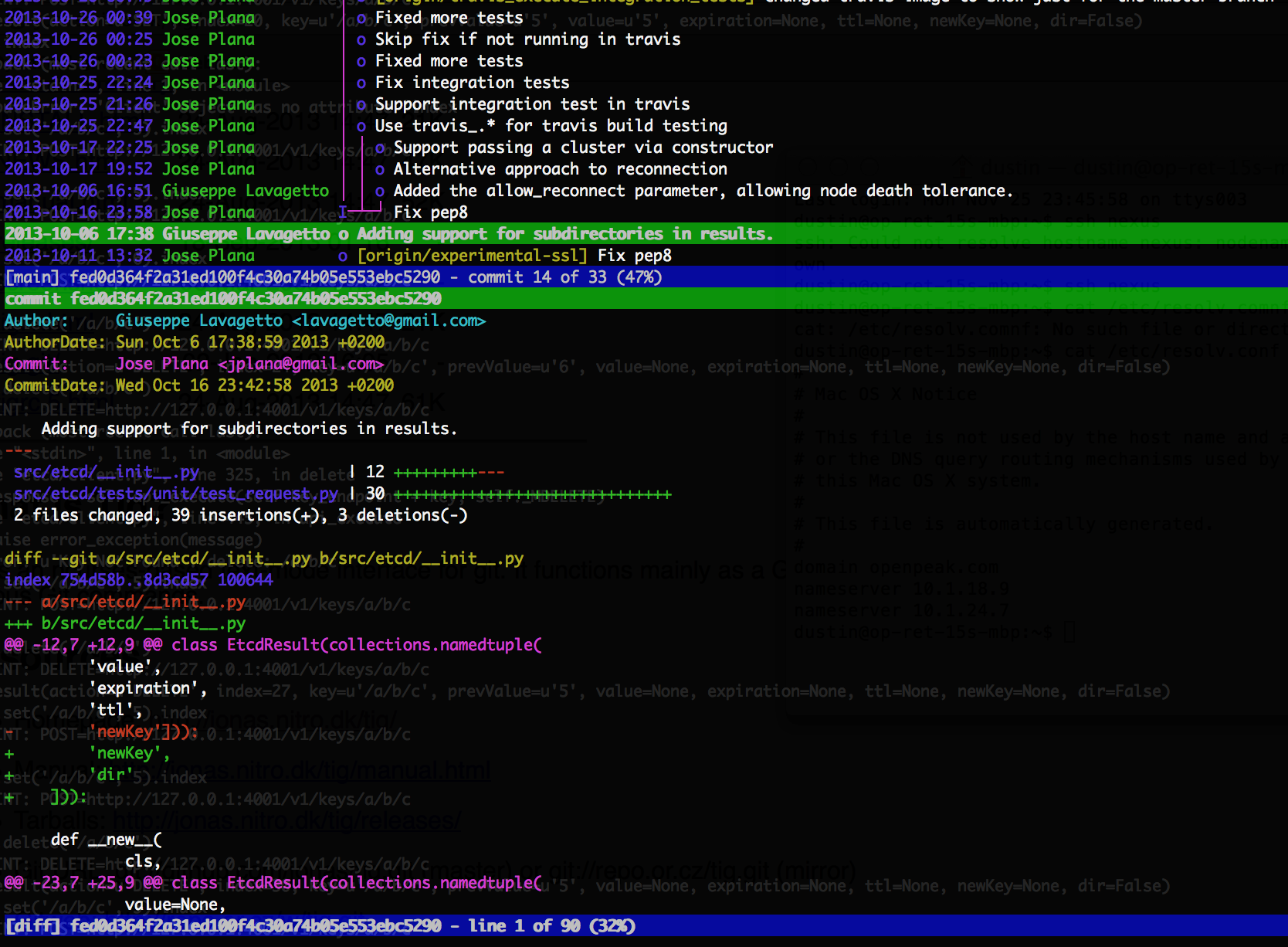
An example of the commit browser. I’ve clicked on a commit to show its diffs:

Git "Tig" Commit Browser

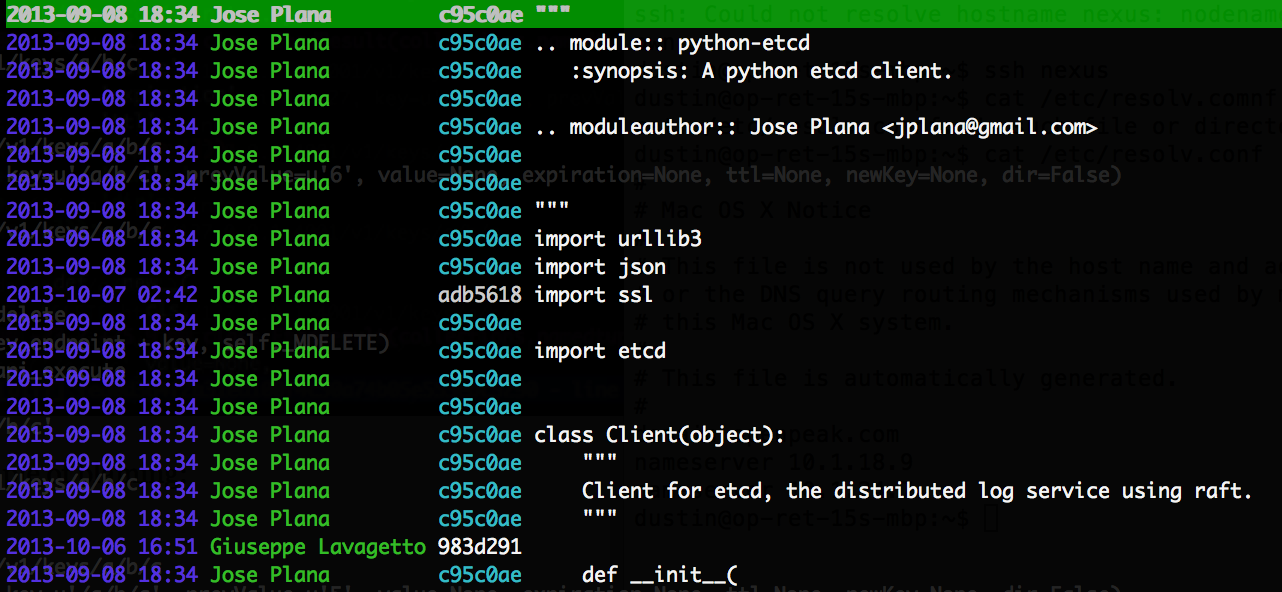
An example of blaming:

Git "Tig" Blame Browser
For more information:

Screenshots
Manual

Using etcd as a Highly Available and Innovative Key-Value Storage

etcd was created as the primary building-block on which CoreOS is built. It uses the Raft algorithm to keep changes consistent throughout a cluster by electing a leader and distributing a log of operations (“commands”) from the leader to the other systems. Due to these features and others, etcd to be used for robust service-discovery and cluster configuration, replacing ZooKeeper. Entries are referred-to as “nodes”.


Distributed Locks

Every update automatically increments the “index”, which is a global, monotonically-increasing value, incremented for every operation:

c.set('/a/b/c', 5).index
# 66
c.set('/a/b/c', 5).index
# 67

The index increases for every operation, not just those with side-effects. Per the mailing list (2013-11-29), the reason for this is:

That’s a side effect of how Raft works. When new commands come in they get sent to Raft immediately which increments the index. We’re not able to check the current value of the key before insert because Raft batches commands so there may be uncommitted changes between the current state and the state at the time when the command is being committed. That’s also why changes that cause errors can increment the index even though no change was made.

etcd also gives us a “CAS” (“compare and swap”) call (“test_and_set” in the Python client). This allows us to assign a value to a key, but only when the existing value meets one or more conditions:

  1. The existing value is set to something specific (a “previous value” condition).
  2. The existing index is set to something specific (a “previous index” condition).
  3. The key either currently exists or doesn’t (a “previously exists” condition).

The existence of a monotonic, atomic counter and a CAS function happen to be the exact dependencies required to establish distributed locking. The process might be the following:

  1. Initialize a node for the specific lock (“lock node”). Use CAS with a “prevExists” of “false” and a value of “0”.
  2. Assign some value to some dummy key used for the purpose of incrementing and grabbing the index. This index will be used as a unique ID for the current thread/instance (“instance ID”).
  3. Do a CAS on the lock node with a “prevValue” of “0”, a value of the instance-ID, and a TTL of whatever maximum lock time we should allow.
    • If error, watch the lock node. Give the HTTP client a timeout. Try again after long-polling returns or timeout hits.
    • If no error, do whatever logic is required, and, to release, use a CAS to set the lock-node to “0” with a “prevValue” of the instance-ID. If this fails (ValueError), then the lock has been reowned by another instance after having timed-out.

It’s important to mention that the “test_and_set” operation in the Python client only currently supports the “prevValue” condition. With the “prevValue” condition, you’ll get a KeyError if the key doesn’t exist. If the real existing value does not match the stated existing value, you’ll get a ValueError (which is a standard consideration when using this call).


Additional Features

Aside from being so consistent and having easy access to the operations via REST, there are two non-traditional operations that you’ll see with etcd but not with [most] other KV solutions:

  1. Entries can be stored in a hierarchy
  2. Long-polling to wait on a change to a key or folder (“watch”)

With (2), you can monitor a key that doesn’t yet exist, or even a folder (in which case, it’ll block until any value inside the folder changes, recursively). You can use this to achieve event-driven scripts (a neat usage mentioned on the mailing list).

Lastly, before moving on to the example, the cluster should be kept small:

Every command the client sends to the master is broadcast to all of the 
followers. The command is not committed until the majority of the cluster peers 
receive that command.

Because of this majority voting property, the ideal cluster should be kept 
small to keep speed up and be made up of an odd number of peers.

(what size cluster should I use)

etcd is based on Google’s Chubby (which uses Paxos rather than Raft).


Quick Start

For this example, we’re going to establish and interact with etcd using three different terminals on the same system. etcd requires Go 1.1+. You’ll probably have to build it (via a “Git” clone call, and a build), as it’s not yet available via many package managers (Ubuntu, specifically).

Run etcd:

$ etcd
[etcd] Nov 28 13:02:20.849 INFO      | Wrote node configuration to 'info'
[etcd] Nov 28 13:02:20.849 INFO      | etcd server [name default-name, listen on 127.0.0.1:4001, advertised url http://127.0.0.1:4001]
[etcd] Nov 28 13:02:20.850 INFO      | raft server [name default-name, listen on 127.0.0.1:7001, advertised url http://127.0.0.1:7001]

Creating a cluster is as easy as simply launching additional instances of the daemon on new hosts. Now, install Python’s python-etcd:

sudo pip install python-etcd

Connect the client:

from etcd import Client
c = Client(host='127.0.0.1')

Set a value (notice that we have to specify a folder, even if it’s only the root):

c.set('/test_entry', 'abc')

EtcdResult(action=u'SET', index=9, key=u'/test_entry', prevValue=None, value=u'abc', expiration=None, ttl=None, newKey=True)
# Actions available on EtcdResult: action, count, expiration, index, key, newKey, prevValue, ttl, value

Get the value:

r = c.get('/test_entry')
print(r.value)
# Prints "abc"

In a second terminal, connect the client and run the following to block for a change to the given folder (it doesn’t currently exist):

r = c.watch('/test_folder')

Back in the first terminal, run:

c.set('/test_folder/test_inner_folder/deep_test', 'abc')

The command waiting in the second terminal has now returned. Examine “r”:

print(r)
EtcdResult(action=u'SET', index=15, key=u'/test_folder/test_inner_folder/deep_test', prevValue=None, value=u'abc', expiration=None, ttl=None, newKey=True)

Get a listing of children. This may or may not work on “/”, depending on your python-etcd version:

from pprint import pprint
c.set('/test_folder/entry_1', 'test_value_1')
c.set('/test_folder/entry_2', 'test_value_2')
list_ = c.get('/test_folder')
pprint(list_)
#[EtcdResult(action=u'GET', index=4, key=u'/test_folder/entry_1', prevValue=None, value=u'test_value_1', expiration=None, ttl=None, newKey=None),
# EtcdResult(action=u'GET', index=4, key=u'/test_folder/entry_2', prevValue=None, value=u'test_value_2', expiration=None, ttl=None, newKey=None)]

etcd also allows for TTLs (in seconds) on “put” operations:

from time import sleep
c.set('/disappearing_entry', 'inconsequential_value', ttl=5)
sleep(5)
c.get('/disappearing_entry')

You’ll get the following error (a proper KeyError):

Traceback (most recent call last):
  File "", line 1, in 
  File "/Library/Python/2.7/site-packages/etcd/client.py", line 284, in get
    response = self.api_execute(self.key_endpoint + key, self._MGET)
  File "/Library/Python/2.7/site-packages/etcd/client.py", line 357, in api_execute
    raise error_exception(message)
KeyError: u'Key Not Found : get: /disappearing_entry'

Miscellaneous functions:

c.machines
# ['http://127.0.0.1:4001']
c.leader
# 'http://127.0.0.1:7001'

As a final note, you don’t have to choose between cURL requests and the API. Rather, there’s also etcdctl for command-line control:

$ etcdctl set /foo/bar "Hello world"
Hello world


FAQ

Leaders are elected using elections. However, there’s a chance that a leader won’t be elected, and the elections will have to be reattempted. From the mailing list (2013-11-29):

Q: What would cause a leader candidate to not receive a majority of votes from nodes, during elections?
A: The common case election failure would be due to either a network partition causing less than a quorum to vote, or another candidate being elected first.

Q: Is there any decision-making involved during elections, such as the consideration of the CPU utilizations of individual machines?
A: Not at this time. It might make sense to add some sort of fitness to the leader proposal decision later.

Using Bitly’s NSQ Job Queue

I’ve recently been impressed by Bitly’s NSQ server, written in Go. Aside from the part about Go capturing my attention, the part that most interested me was 1) they claim that it achieves 90,000 messages/second (which is decent), and 2) it’s relatively easy to set-up, and it’s self-managing.

The topology for NSQ is straight forward: N queue servers (nsqd), 0+ lookup servers (nsqlookupd), and an optional admin (dashboard) server (nsqadmin). The lookup servers are optional, but they allow auto-discovery of which hosts are managing which topics. Bitly recommends that a cluster of three are used in production. To start multiple instances, just launch them. You’ll have to pass in a list of nsqlookupd hosts to the consumer client, and a list of nsqd hosts to the producer client.

The message pipeline is intuitive: messages are pushed along with topics/classifiers, and consumers listen for topics and channels. A channel is a named grouping of consumers that work on similar tasks, where the “channel” is presented as a string to the consumer instance. NSQ uses the concepts of topics and channels to drive multicast and distributed delivery.

As far as optimization goes, there are about three dozen parameters for nsqd, but you need not concern yourself with most of them, here.

This example resembles the one from the NSQ website, plus some additional info. All four processes can be run from the same system.

Quick Start

Get and build the primary components. $GOPATH needs to either be set to your Go workspace (mine is ~/.go, below), or an empty directory that will be used for it. $GOPATH/bin needs to be in the path.

go get github.com/kr/godep

godep get github.com/bitly/nsq/nsqd
godep get github.com/bitly/nsq/nsqlookupd
godep get github.com/bitly/nsq/nsqadmin

To start, run each of the following services in a different terminal on the same system.

A lookup server instance:

nsqlookupd

A queue instance:

nsqd --lookupd-tcp-address=127.0.0.1:4160

An admin server instance:

nsqadmin --template-dir=~/.go/src/github.com/bitly/nsq/nsqadmin/templates --lookupd-http-address=127.0.0.1:4161

To push test-items:

curl -d 'hello world 1' 'http://127.0.0.1:4151/put?topic=test'
curl -d 'hello world 2' 'http://127.0.0.1:4151/put?topic=test'
curl -d 'hello world 3' 'http://127.0.0.1:4151/put?topic=test'

The “apps” aren’t built, apparently, by default. We’ll need these so we can get a message-dumper, for testing:

~/.go/src/github.com/bitly/nsq$ make
cd build/apps

To dump data that’s already waiting in the queues:

./nsq_to_file --topic=test --output-dir=/tmp --lookupd-http-address=127.0.0.1:4161

Display queue data:

cat /tmp/test.*.log
hello world 1
hello world 2
hello world 3

Python Library

Matt Reiferson wrote pynsq, which is a Python client that employs Tornado for it’s message-loops. The gotcha is that both the consumers -and- producers both require you to use IOLoop, Tornado’s message-loop. This is because pynsq not only allows you to define a “receive” callback, but a post-send callback as well. Though you don’t have to define one, there is an obscure, but real, chance that a send will fail, per Matt, and should always be checked for.

Because of this design, you should be prepared to put all of your core loop logic into the Tornado loop.

To install the client:

sudo pip install pynsq tornado

A producer example from the “pynsq” website:

import nsq
import tornado.ioloop
import time

def pub_message():
    writer.pub('test', time.strftime('%H:%M:%S'), finish_pub)

def finish_pub(conn, data):
    print data

writer = nsq.Writer(['127.0.0.1:4150'])
tornado.ioloop.PeriodicCallback(pub_message, 1000).start()
nsq.run()

An asynchronous consumer example from the “pynsq” website (doesn’t correspond to the producer example):

import nsq

buf = []

def process_message(message):
    global buf
    message.enable_async()
    # cache the message for later processing
    buf.append(message)
    if len(buf) >= 3:
        for msg in buf:
            print msg
            msg.finish()
        buf = []
    else:
        print 'deferring processing'

r = nsq.Reader(message_handler=process_message,
        lookupd_http_addresses=['http://127.0.0.1:4161'],
        topic='nsq_reader', channel='async', max_in_flight=9)
nsq.run()

Give it a try.

FAQ

(Courtesy of a dialogue with Matt Reiferson)

Q: Most job-queues allow you send messages without imposing a loop. Is the 
   IOLoop required for both receiving -and- sending in pynsq?
A: Yes. pynsq supports the notion of completion-callbacks to signal when a send 
   finishes. Even if you don't use it, it's accounted-for in the mechanics. If 
   you want to send synchronous messages without the loop, hit the HTTP 
   endpoint. However, facilitating both the receive and send IOLoops allows for 
   the fasted possible dialogue, especially when the writers and readers are 
   paired to the same hosts.

Q: An IOLoop is even required for asynchronous sends?
A: Yes. If you want to simply send one-off asynchronous messages, 
   consider opening a worker process that manages delivery. It can apply its 
   own callback to catch failures, and transmit successes, failures, etc.. to 
   an IPC queue (if you need this info).

Q: Are there any delivery guarantees (like in ZeroMQ)?
A: No. It's considered good-practice by the NSQ guys to always check the 
   results of message-sends in any situation (in any kind of messaging, in 
   general). You'd do this from the callbacks, with pynsq.

    The reasons that a send would fail are the following:

    1: The topic name is not formatted correctly (to character/length 
       restrictions). There is no official documentation of this, however.
    2: The message is too large (this can be set via a parameter to nsqd).
    3: There is a breakdown related to a race-condition with a publish and a 
       delete happening on a specific topic. This is rare.
    4: Client connection-related failures.

Q: In scenario (3) of the potential reasons for a send-failure, can I mitigate 
   the publish/delete phenomena if I am either not deleting topics or have 
   orchestrated deletions such that writes eliciting topic creations will never 
   be done until a sufficient amount of time has elapsed since a deletion?
A: Largely. Though, if nowhere else, this can also happen internally to NSQ at 
   shutdown.

Q: How are new topics announced to the cluster?
A: The first writer or reader request for a topic will be applied on the 
   upstream nsqd host, and will then propagate to the nsqlookupd hosts. They will 
   eventually spread to the other readers from there. The same thing applies to 
   a new topic, as well as a previously-deleted one.

OCR a Document by Section

A previous post described how to use Tesseract to OCR a document to a single string. This post will describe how to take advantage of Tesseract’s internal layout processing to iterate through the documents sections (as determined by Tesseract).

This is the core logic to iterate through the document. Each section is referred to as a “paragraph”:

if(api->Recognize(NULL) < 0)
{
    api->End();
    pixDestroy(&image);

    return 3;
}

tesseract::ResultIterator *it = api->GetIterator();

do 
{
    if(it->Empty(tesseract::RIL_PARA))
        continue;

    char *para_text = it->GetUTF8Text(tesseract::RIL_PARA);

// para_text is the recognized text. It [usually] has a 
// newline on the end.

    delete[] para_text;
} while (it->Next(tesseract::RIL_PARA));

delete it;

To add some validation to the recognized content, we’ll also check the recognition confidence. In my experience, it seems like any recognition scoring less than 80% turned out as gibberish. In that case, you’ll have to do some preprocessing to remove some of the risk.

int confidence = api->MeanTextConf();
printf("Confidence: %d\n", confidence);
if(confidence < 80)
    printf("Confidence is low!\n");

The whole program:

#include <stdio.h>

#include <tesseract/baseapi.h>
#include <tesseract/resultiterator.h>

#include <leptonica/allheaders.h>

int main()
{
    tesseract::TessBaseAPI *api = new tesseract::TessBaseAPI();

    // Initialize tesseract-ocr with English, without specifying tessdata path.
    if (api->Init(NULL, "eng")) 
    {
        api->End();

        return 1;
    }

    // Open input image with leptonica library
    Pix *image;
    if((image = pixRead("receipt.png")) == NULL)
    {
        api->End();

        return 2;
    }
    
    api->SetImage(image);
    
    if(api->Recognize(NULL) < 0)
    {
        api->End();
        pixDestroy(&image);

        return 3;
    }

    int confidence = api->MeanTextConf();
    printf("Confidence: %d\n", confidence);
    if(confidence < 80)
        printf("Confidence is low!\n");

    tesseract::ResultIterator *it = api->GetIterator();

    do 
    {
        printf("=================\n");
        if(it->Empty(tesseract::RIL_PARA))
            continue;

        char *para_text = it->GetUTF8Text(tesseract::RIL_PARA);
        printf("%s", para_text);
        delete[] para_text;
    } while (it->Next(tesseract::RIL_PARA));
  
    delete it;

    api->End();
    pixDestroy(&image);

    return 0;
}

Applying this routine to an invoice (randomly found with Google), it is far easier to identify the address, tax, total, etc.. then with the previous method (which was naive about layout):

Confidence: 89
=================
Invoice |NV0010 '
To
Jackie Kensington
18 High St
Wickham
 Electrical
Sevices Limited

=================
Certificate Number CER/123-34 From
  1”” E'e°‘''°‘'’‘'Se”'°‘*’
17 Harold Grove, Woodhouse, Leeds,

=================
West Yorkshire, LS6 2EZ

=================
Email: info@ mj-e|ectrcia|.co.uk

=================
Tel: 441132816781

=================
Due Date : 17th Mar 2012

=================
Invoice Date : 16th Feb 2012

=================
Item Quantity Unit Price Line Price
Electrical Labour 4 £33.00 £132.00

=================
Installation carried out on flat 18. Installed 3 new
brass effect plug fittings. Checked fuses.
Reconnected light switch and fitted dimmer in living
room. 4 hours on site at £33 per hour.

=================
Volex 13A 2G DP Sw Skt Wht Ins BB Round Edge Brass Effect 3 £15.57 £46.71
Volex 4G 1W 250W Dimmer Brushed Brass Round Edge 1 £32.00 £32.00
Subtotal £210.71

=================
VAT £42.14

=================
Total £252.85

=================
Thank you for your business — Please make all cheques payable to ‘Company Name’. For bank transfers ‘HSBC’, sort code
00-00-00, Account no. 01010101.
MJ Electrical Services, Registered in England & Wales, VAT number 9584 158 35
 Q '|'.~..a::

OCR a Document with C++

There is an OCR library developed by HP and maintained by Google called Tesseract. It works immediately, and does not require training.

Building it is trivial. What’s more trivial is just installing it from packages:

$ sudo apt-get install libtesseract3 libtesseract-dev
$ sudo apt-get install liblept3 libleptonica-dev
$ sudo apt-get install tesseract-ocr-eng

Note that this installs the data for recognizing English.

Now, go and get the example code from the Google Code wiki for the project, and paste it into a file called ocr-test.cpp . Also, right-click and save the example document image (a random image I found with Google). You don’t have to use this particular document, as long as what is used is sufficiently clear at a high-enough resolution (the example is about 1500×2000).

Now, change the location of the file referred-to by the example code:

Pix *image = pixRead("letter.jpg");

Compile/link it:

$ g++ -o ocr-test ocr-test.cpp -ltesseract -llept

Run the example:

./ocr-test

You’re done. The following will be displayed:

OCR output:
fie’  1?/2440
Brussels,
BARROSO (2012) 1300171
BARROSO (2012)

Dear Lord Tugendhat.

Thank you for your letter of 29 October and for inviting the European Commission to

contribute in the context of the Economic Aflairs Committee's inquiry into "The

Economic lmplicationsfirr the United Kingdom of Scottish Independence ".

The Committee will understand that it is not the role of the European Commission to

express a position on questions of internal organisation related to the constitutional

arrangements of a particular Member State.

Whilst refraining from comment on possible fitture scenarios. the European Commission

has expressed its views in general in response to several parliamentary questions from

Members of the European Parliament. In these replies the European Commission has 
noted that scenarios such as the separation of one part of a Member State or the creation 
of a new state would not be neutral as regards the EU Treaties. The European 
Commission would express its opinion on the legal consequences under EU law upon ;
requestfiom a Member State detailing a precise scenario. :
The EU is founded on the Treaties which apply only to the Member States who have 3
agreed and ratified them. if part of the territory of a Member State would cease to be ,
part of that state because it were to become a new independent state, the Treaties would

no longer apply to that territory. In other words, a new independent state would, by the
fact of its independence, become a third country with respect to the E U and the Treaties

would no longer apply on its territory. ‘

../.

The Lord TUGENDHAT
Acting Chairman

House of Lords q
Committee Oflice
E-mail: economicaflairs@par1igment.ttk

Cheap and Easy Virtual Machine Containers with LXC

The thing that most virtual-machine solutions have in common is the overhead required to run them. There’s a substantial resource cost for the management of these containers, aside from that for the machine itself.

There’s an alternative to all of that, called LXC. In fact, though it used to require an impossible number of steps to configure, it’s now sufficient to just pass in a couple of command-line parameters and leave everything else to defaults.

LXC is somewhere between chroot and QEMU. It imposes resource control using the cgroups functionality that comes packaged in the kernel, which is, essentially, the next evolution of ulimit. Although the resource-control is somewhat disabled by default, you can set limits even so far as disk I/O rates.

It’s important to know that, though LXC works terrifically, it should only be used in either personal systems or any other system that’s sufficiently fenced-off from outside threats. This is because it doesn’t benefit from 100% isolation like most VM’s do (a tradeoff for its lightweightedness). An example of this is that the container shares the same sysfs as the host, due to limitations in sysfs. Therefore, changing sysfs from the container will affect the host.

Though there are security concerns, I have been told authoritatively that there is a less likely chance of a rogue application causing issues for the larger host than any other critical problem that systems usually encounter in production. So, a couple of built-in security concessions are the only plausible risks.

System Containers

There’s an easy way and a hard way to create system containers. The hard way is to create and populate it with all of the configuration that is required of any new system (see here). The easy way is to simply use the “lxc-create” tool and tell it to follow a template.

These are the templates available in my installation:

$ ls -1 /usr/share/lxc/templates
alpine
altlinux
archlinux
busybox
debian
fedora
opensuse
oracle
sshd
ubuntu
ubuntu-cloud

You can only use a template that’s compatible with the system on which you are working. Otherwise, you’ll find that “yum”, for instance, is missing if you try to build a Fedora instance on Ubuntu, as well as categorically-similar issues with the other templates. On my Ubuntu, I can create containers with the “busybox” (which creates instantaneously), “debian” and “ubuntu” (7 minutes), “ubuntu-cloud” (6 minutes), and “sshd” (see below) templates. Note that any required, downloaded images are cached, and subsequent builds only take a minute or two.

The current steps to build an Ubuntu container (from my Ubuntu box, after installing the lxc package):

$ sudo lxc-create -t ubuntu -n <container name>

Depending on the template, you might see something like this upon completion:

# The default user is 'ubuntu' with password 'ubuntu'!
# Use the 'sudo' command to run tasks as root in the container.

I named my container “ubuntu-2”. The container directories get created in /var/lib/lxc, and have a reasonable size:

$ ls -l /var/lib/lxc
total 4
drwxr-xr-x 3 root root 4096 Nov  6 02:32 ubuntu-2

$ sudo du -sh /var/lib/lxc/ubuntu-2/
263M    /var/lib/lxc/ubuntu-2/

To start the container as a daemon:

$ sudo lxc-start -n ubuntu-2 -d

Or, to start the container as a foreground machine, complete with console (using another, BusyBox-based, container, which shows this better):

$ sudo lxc-start -n busybox-1
udhcpc (v1.20.2) started
Sending discover...
Sending select for 10.0.3.79...
Lease of 10.0.3.79 obtained, lease time 3600

Please press Enter to activate this console. 

To list the currently-running containers:

$ sudo lxc-ls --fancy
NAME       STATE    IPV4        IPV6  AUTOSTART  
-----------------------------------------------
busybox-1  STOPPED  -           -     NO         
debian-1   RUNNING  10.0.3.247  -     NO         
ubuntu-1   RUNNING  10.0.3.217  -     NO         
ubuntu-2   RUNNING  10.0.3.249  -     NO         

Very cool. To connect via SSH:

$ ssh ubuntu@10.0.3.249
The authenticity of host '10.0.3.249 (10.0.3.249)' can't be established.
ECDSA key fingerprint is 73:8c:31:53:76:36:93:6e:59:ee:3f:d3:6f:27:13:c7.
Are you sure you want to continue connecting (yes/no)? yes
Warning: Permanently added '10.0.3.249' (ECDSA) to the list of known hosts.
ubuntu@10.0.3.249's password: 

The programs included with the Ubuntu system are free software;
the exact distribution terms for each program are described in the
individual files in /usr/share/doc/*/copyright.

Ubuntu comes with ABSOLUTELY NO WARRANTY, to the extent permitted by
applicable law.

Welcome to Ubuntu 13.04 (GNU/Linux 3.8.0-30-generic i686)

 * Documentation:  https://help.ubuntu.com/
ubuntu@ubuntu-2:~$ 

To stop the container:

$ sudo lxc-stop -n ubuntu-2

If you don’t want, or need, to build a new system, you can also configure an “ssh container”, where a read-only mount of the current filesystem is combined with an SSH server to create the facade of a separate machine instance. It’s unclear whether there’s a provision to allow changes (such as implementing a ramdisk to produce the illusion of a read-write experience similar to a disc-based “live” Linux distribution).

Application Containers

In addition to hosting “system” containers, LXC can also host “application” containers. Quite obviously, the latter simply host applications with all of the benefits of the resource-control that we’ve already mentioned, as well as, most likely, its security limitations.

$ sudo lxc-execute -n <container name> <command>

You might see an error like the following:

$ sudo lxc-execute -n app_container_1 touch /tmp/aa
lxc-execute: Permission denied - failed to change apparmor profile to lxc-container-default
lxc-execute: invalid sequence number 1. expected 4
lxc-execute: failed to spawn 'app_container_1'

The workaround is:

$ cat > test.conf <<EOF
lxc.aa_profile = unconfined
lxc.rootfs = /
EOF

$ sudo lxc-execute -f test.conf -n app-container-1 touch /tmp/aa

When the application container launches, you’ll be able to see it in the lxc-ls list (above). You’ll also be able to find it in the ps list. Obviously the command-above just touches a file before returning, so it won’t be alive long-enough for you to be able to see it running.

Development Support

Naturally, everything we’ve mentioned can be done from code (Python, Lua, and Go, currently). This is a Python example mentioned on the LXC homepage (whose link was at the beginning of the article):

import lxc
container = lxc.Container("p1")
container.create("ubuntu")
container.start()
container.get_ips()
container.stop()

As mentioned, LXC isn’t the right-kind of container for serving from the DMZ in a corporate environment, but it is awesome as a fast, easily-constructed, hold-no-prisoners system container, where you want to run a dozen on a commodity box with minimal resource consumption.