
I uploaded a project that has some boilerplate scripts/code to establish CA keys and certificate, as well as scripts/code to create and sign subordinate certificates.
I started needing to duplicate this code, so I had to formalize it into a project.
I uploaded a project that has some boilerplate scripts/code to establish CA keys and certificate, as well as scripts/code to create and sign subordinate certificates.
I started needing to duplicate this code, so I had to formalize it into a project.
Very cool project, started fifty-years ago:
54-year-old software project escapes vapor status to take on the PDF
Python 3.3 added a new file mode that allows you to create a new file and open it for write only if it does not already exist.
>>> with open('new_file', 'x') as f:
...   pass
...
>>> with open('new_file', 'x') as f:
...   pass
...
Traceback (most recent call last):
  File "", line 1, in
FileExistsError: [Errno 17] File exists: 'new_file'
You might eventually have to unit-test a website that has a functional need to be run as SSL. For example, you might need to test a client that must connect using SSL authentication.
You can accomplish this by combining Python’s built-in webserver with ssl.SSLSocket.
This code is a distant relative of another example, but is lighter, simpler, and more Pythonic.
It runs out of the current directory (you’ll have to chdir() from the code if you want something different, since the webserver doesn’t take a path), and expects server.private_key.pem and server.crt.pem to exist.
import os.path
import socket
import SocketServer
import BaseHTTPServer
import SimpleHTTPServer
import ssl

class _SecureHTTPRequestHandler(SimpleHTTPServer.SimpleHTTPRequestHandler):
    def setup(self):
        self.connection = self.request
        self.rfile = socket._fileobject(self.request, 'rb', self.rbufsize)
        self.wfile = socket._fileobject(self.request, 'wb', self.wbufsize)

class _SecureHTTPServer(BaseHTTPServer.HTTPServer):
    def __init__(self, private_key_pem_filepath, cert_pem_filepath,
                 binding=None, handler_cls=_SecureHTTPRequestHandler):
        if binding is None:
            # The default port is 1443 so that we don't have to be root.
            binding = ('', 1443)

        # We can't use super() because it's not a new-style class.
        SocketServer.BaseServer.__init__(self, binding, handler_cls)

        s = socket.socket(self.address_family, self.socket_type)
        self.socket = ssl.SSLSocket(
                        s,
                        keyfile=private_key_pem_filepath,
                        certfile=cert_pem_filepath)

        self.server_bind()
        self.server_activate()

app_path = os.path.abspath(os.path.dirname(__file__))

private_key_pem_filepath = os.path.join(app_path, 'server.private_key.pem')
certificate_pem_filepath = os.path.join(app_path, 'server.crt.pem')

httpd = _SecureHTTPServer(
            private_key_pem_filepath,
            certificate_pem_filepath)

print("Running.")
httpd.serve_forever()
This code may also be found in the RandomUtility repository.
The requirement for service-discovery comes with the territory when you’re dealing with large farms containing multiple large components that might be themselves load-balanced clusters. Service discovery becomes a useful abstraction to map the specific designations and port numbers of the your services/load-balancers to nice, semantic names. The utility of this is being able to refer to things by semantic names instead of IP address, or even hostnames.
However, such a useful layer gets completely passed-over in medium-sized networks.
Here enters consul.io. It has a handful of useful characteristics, and it’s very easy to get started. I’ll cover the process here, and reiterate some of the examples from their homepage, below.
An instance of the Consul agent runs on every machine of the services that you want to publish. The instances of Consul form a Consul cluster. Each machine has a directory in which are stored “service definition” files for each service you wish to announce. You then hit either a REST endpoint or do a DNS query to render an IP. They’re especially proud of the DNS-compatible interface, and it provides for automatic caching.
Multiple machines can announce themselves for the same services, and they’ll all be enumerated in the result. In fact, Consul will use a load-balancing strategy similar to round-robin when it returns DNS answers.
Generally speaking, service-discovery is a relatively simple concept to both understand and even implement. However, the following things are especially cool/interesting/fun:
We’re only going to do a quick reiteration of the more obvious/useful functionalities.
We’ll only be configuring one server (thus completely open to data loss).
$ git clone git@github.com:hashicorp/consul.git src/github.com/hashicorp/consul
Cloning into 'src/github.com/hashicorp/consul'...
remote: Counting objects: 5701, done.
remote: Compressing objects: 100% (1839/1839), done.
remote: Total 5701 (delta 3989), reused 5433 (delta 3803)
Receiving objects: 100% (5701/5701), 4.69 MiB | 1.18 MiB/s, done.
Resolving deltas: 100% (3989/3989), done.
Checking connectivity... done.
$ cd src/github.com/hashicorp/consul
$ make
$ make
--> Installing build dependencies
github.com/armon/circbuf (download)
github.com/armon/go-metrics (download)
github.com/armon/gomdb (download)
github.com/ugorji/go (download)
github.com/hashicorp/memberlist (download)
github.com/hashicorp/raft (download)
github.com/hashicorp/raft-mdb (download)
github.com/hashicorp/serf (download)
github.com/inconshreveable/muxado (download)
github.com/hashicorp/go-syslog (download)
github.com/hashicorp/logutils (download)
github.com/miekg/dns (download)
github.com/mitchellh/cli (download)
github.com/mitchellh/mapstructure (download)
github.com/ryanuber/columnize (download)
--> Running go fmt
--> Installing dependencies to speed up builds...
# github.com/armon/gomdb
../../armon/gomdb/mdb.c:8513:46: warning: data argument not used by format string [-Wformat-extra-args]
/usr/include/secure/_stdio.h:47:56: note: expanded from macro 'sprintf'
--> Building...
github.com/hashicorp/consul
{"service": {"name": "web", "tags": ["rails"], "port": 80}}
$ bin/consul agent -server -bootstrap -data-dir /tmp/consul -config-dir /etc/consul.d
Receive a highly efficient but eventually-consistent list of agent/service nodes:
$ bin/consul members
dustinsilver.local  192.168.10.16:8301  alive  role=consul,dc=dc1,vsn=1,vsn_min=1,vsn_max=1,port=8300,bootstrap=1
Get a complete list of current nodes:
$ curl localhost:8500/v1/catalog/nodes
[{"Node":"dustinsilver.local","Address":"192.168.10.16"}]
Verify membership:
$ dig @127.0.0.1 -p 8600 dustinsilver.local.node.consul

; <> DiG 9.8.3-P1 <> @127.0.0.1 -p 8600 dustinsilver.local.node.consul
; (1 server found)
;; global options: +cmd
;; Got answer:
;; ->>HEADER<<- opcode: QUERY, status: NOERROR, id: 46780
;; flags: qr aa rd; QUERY: 1, ANSWER: 1, AUTHORITY: 0, ADDITIONAL: 0
;; WARNING: recursion requested but not available

;; QUESTION SECTION:
;dustinsilver.local.node.consul.	IN	A

;; ANSWER SECTION:
dustinsilver.local.node.consul.	0 IN	A	192.168.10.16

;; Query time: 0 msec
;; SERVER: 127.0.0.1#8600(127.0.0.1)
;; WHEN: Sun May 25 03:17:49 2014
;; MSG SIZE  rcvd: 94
Pull an IP for the service named “web” using DNS (they’ll always have the “service.consul” suffix):
$ dig @127.0.0.1 -p 8600 web.service.consul

; <> DiG 9.8.3-P1 <> @127.0.0.1 -p 8600 web.service.consul
; (1 server found)
;; global options: +cmd
;; Got answer:
;; ->>HEADER<<- opcode: QUERY, status: NOERROR, id: 42343
;; flags: qr aa rd; QUERY: 1, ANSWER: 1, AUTHORITY: 0, ADDITIONAL: 0
;; WARNING: recursion requested but not available

;; QUESTION SECTION:
;web.service.consul.		IN	A

;; ANSWER SECTION:
web.service.consul.	0	IN	A	192.168.10.16

;; Query time: 1 msec
;; SERVER: 127.0.0.1#8600(127.0.0.1)
;; WHEN: Sun May 25 03:20:33 2014
;; MSG SIZE  rcvd: 70
or, HTTP:
$ curl http://localhost:8500/v1/catalog/service/web
[{"Node":"dustinsilver.local","Address":"192.168.10.16","ServiceID":"web","ServiceName":"web","ServiceTags":["rails"],"ServicePort":80}]
Get the port-number, too, using DNS:
$ dig @127.0.0.1 -p 8600 web.service.consul SRV

; <> DiG 9.8.3-P1 <> @127.0.0.1 -p 8600 web.service.consul SRV
; (1 server found)
;; global options: +cmd
;; Got answer:
;; ->>HEADER<<- opcode: QUERY, status: NOERROR, id: 44722
;; flags: qr aa rd; QUERY: 1, ANSWER: 1, AUTHORITY: 0, ADDITIONAL: 1
;; WARNING: recursion requested but not available

;; QUESTION SECTION:
;web.service.consul.		IN	SRV

;; ANSWER SECTION:
web.service.consul.	0	IN	SRV	1 1 80 dustinsilver.local.node.dc1.consul.

;; ADDITIONAL SECTION:
dustinsilver.local.node.dc1.consul. 0 IN A	192.168.10.16

;; Query time: 0 msec
;; SERVER: 127.0.0.1#8600(127.0.0.1)
;; WHEN: Sun May 25 03:21:00 2014
;; MSG SIZE  rcvd: 158
Search by tag:
$ dig @127.0.0.1 -p 8600 rails.web.service.consul

; <> DiG 9.8.3-P1 <> @127.0.0.1 -p 8600 rails.web.service.consul
; (1 server found)
;; global options: +cmd
;; Got answer:
;; ->>HEADER<<- opcode: QUERY, status: NOERROR, id: 16867
;; flags: qr aa rd; QUERY: 1, ANSWER: 1, AUTHORITY: 0, ADDITIONAL: 0
;; WARNING: recursion requested but not available

;; QUESTION SECTION:
;rails.web.service.consul.	IN	A

;; ANSWER SECTION:
rails.web.service.consul. 0	IN	A	192.168.10.16

;; Query time: 0 msec
;; SERVER: 127.0.0.1#8600(127.0.0.1)
;; WHEN: Sun May 25 03:21:26 2014
;; MSG SIZE  rcvd: 82
Bintray is essentially PyPI for non-Python application. It allows you to define download repositories, upload files manually or via API (for continuous integration), and provide a download URL for people from your site. You get 500-megabytes of space for free.
It also imports projects from Github.
*Gossip Protocol: A gossip protocol is a style of computer-to-computer communication protocol inspired by the form of gossip seen in social networks. Modern distributed systems often use gossip protocols to solve problems that might be difficult to solve in other ways, either because the underlying network has an inconvenient structure, is extremely large, or because gossip solutions are the most efficient ones available.
WebRTC is the hottest thing going right now, and allows you to receive live, secure video over RTP right to the browser. It’s videoconferencing without the need for any plugins or software (other than your browser). Better yet, as long as your audio/video is encoded correctly, it doesn’t have to be another person, but a song or movie in your own, private on-demand service.
Currently, Firefox, Chrome, and Opera are the browsers that support this. Unfortunately, you’ll have to shelf your love for Microsoft (who naturally vied for their own, alternative standard), for now.
There are a few different layers and components that are required in order for a developer to take advantage of this, however. This includes an ICE server (which wraps one or more STUN or TURN servers), a data connection to your webserver, whether it’s Ajax, WebSockets, SSE, or something else, properly encoded video (exclusively using Google’s VP8 codec), and properly encoded audio (e.g. Opus)… All of which is encrypted as SRTP (secure RTP).
Any time spent understanding this would be well-worth it for a lot of engineers. If you want to get started, the top five or six books in Amazon’s results (as of this time) are enjoyable reads. Currently, the most authoritative reference is “WebRTC: APIs and RTCWEB Protocols of the HTML5 Real-Time Web“, which is written by two participants of the relevant W3C/IETF working groups.
However, if you decide that you want an easy-as-pie solution and no challenge whatsoever, try out the Janus WebRTC Gateway.
Janus is a C-based RTP bridge for WebRTC. The following are the components that you’ll need to implement:
For our example, we’ll do exactly what they’ve already provided the groundwork for:
Yeah. It’s that simple.
We’re using Ubuntu 14.04 LTS.
$ sudo apt-get install libmicrohttpd-dev libjansson-dev libnice-dev \
    libssl-dev libsrtp-dev libsofia-sip-ua-dev libglib2.0-dev \
    libopus-dev libogg-dev libini-config-dev libcollection-dev \
    pkg-config gengetopt
$ git clone git@github.com:meetecho/janus-gateway.git
Cloning into 'janus-gateway'...
remote: Reusing existing pack: 394, done.
remote: Counting objects: 14, done.
remote: Compressing objects: 100% (14/14), done.
remote: Total 408 (delta 5), reused 0 (delta 0)
Receiving objects: 100% (408/408), 733.31 KiB | 628.00 KiB/s, done.
Resolving deltas: 100% (268/268), done.
Checking connectivity... done.
$ cd janus-gateway
$ ./install.sh
This will display the help for the janus command upon success.
$ cd plugins/streams/
$ ./test_gstreamer_1.sh
Setting pipeline to PAUSED ...
Pipeline is PREROLLING ...
Redistribute latency...
Redistribute latency...
Pipeline is PREROLLED ...
Setting pipeline to PLAYING ...
New clock: GstSystemClock
$ ./janus
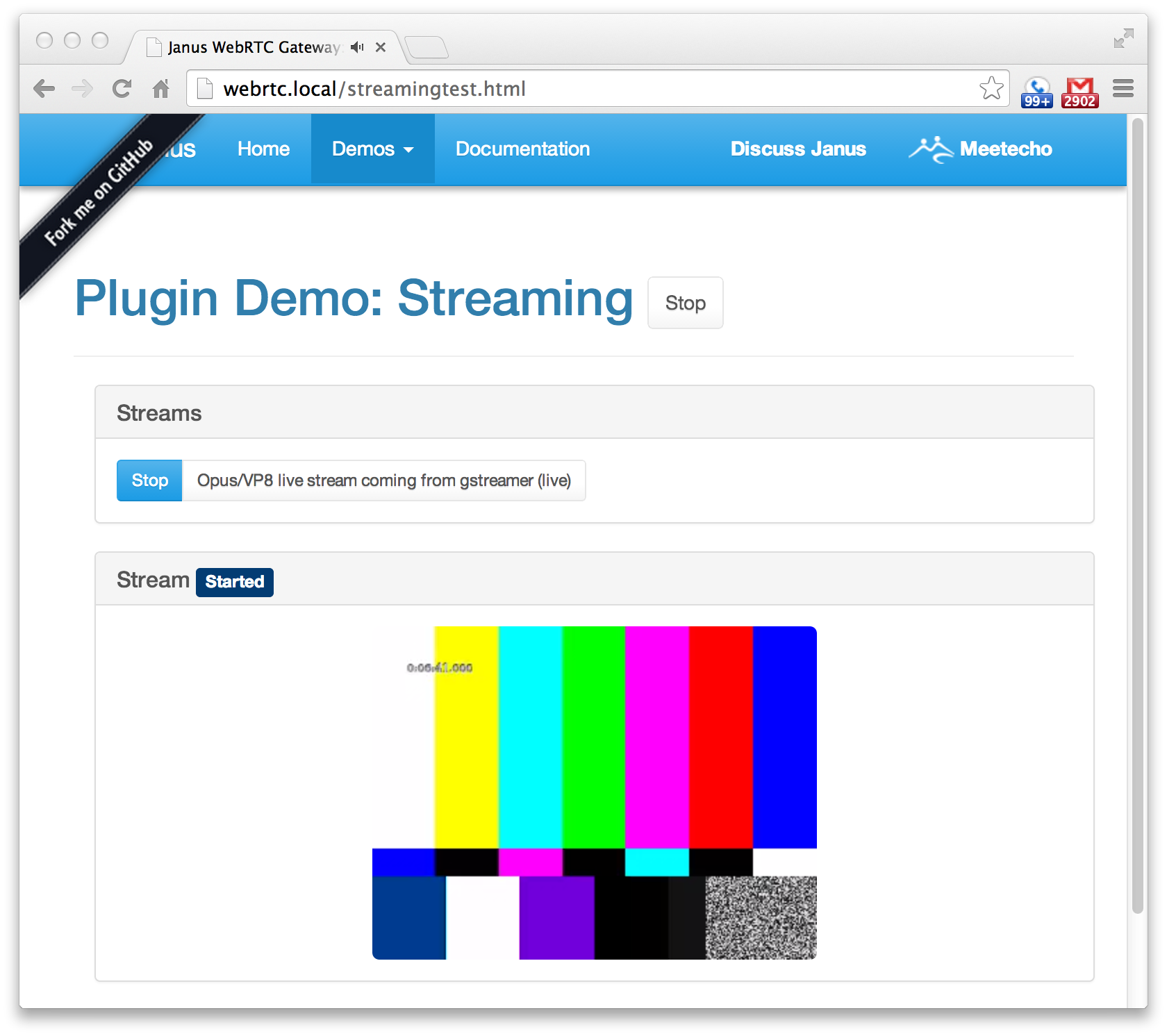
The possibilities are endless with the presentational simplicity of WebRTC, and a simple means by which to harness it.
“Server-Sent Events” (SSE) is the estranged cousin of AJAX and Websockets.
It differs from AJAX in that you hold a connection open while you can receive intermittent messages. It differs from Websockets in that it’s still HTTP based, but only receives messages (you still have the HTTP overhead, but don’t have to support full-duplex communication).
It bears a closer resemblance to Websockets because it holds a connection, and you receive similar messages with identical events (“open”, “error”, “message”). The server, on the other hand, sends plain-text communication (as opposed to Websocket’s new support of plain-text -and- binary communication) in messages that resemble the following:
data: hello world
or (identically):
data: hello
data: world
This guy wrote a great tutorial:
 Random Engineering
You must be logged in to post a comment.